




New Trade Zone
Trade Zone is now live
Use the new Trade Zone for auctions and instant-price trades so Pokemon and item offers are easy to find.

Mastersam
Registered User
-
Joined
-
Last visited
Everything posted by Mastersam
-
15 minit
-
Ok with your offer it extends 15 minits to the bid. It is almost over wait a while.
-
Yes
-
4 hour 45 minit left
-
22 hours left
-
bmup
-
Up
-
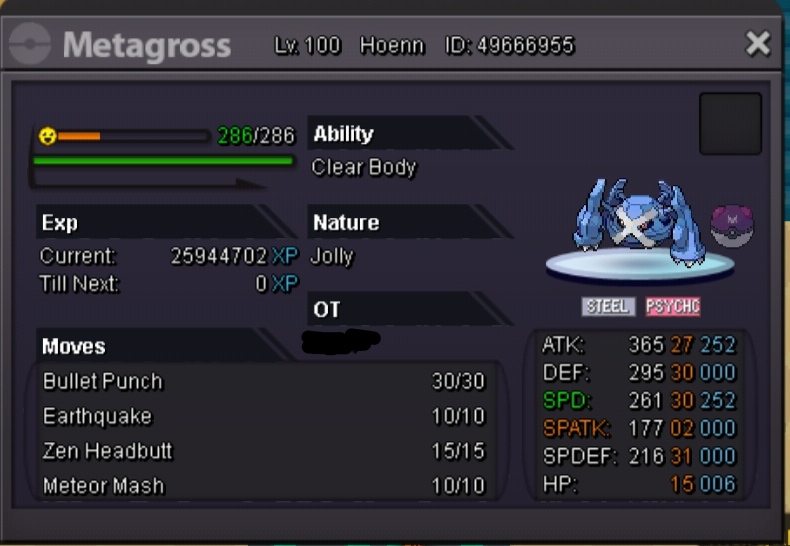
Start offer: 1million Minimum bid: 200 k Insta: 3.5 million Time limit: 24 hour after 1st call
-
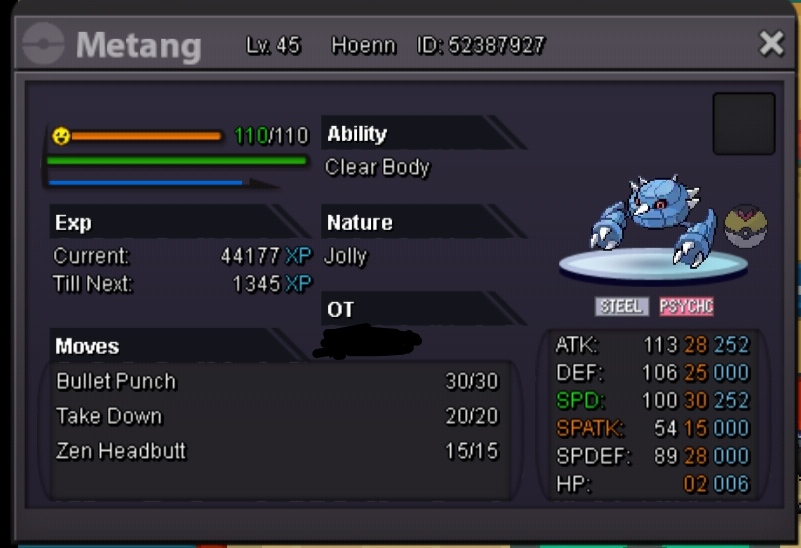
Jolly Metang 30 speed 800k
-
Congratulations Bro
-
Insta 4 million. Meet me in Vermilion
-
IGN: MasterSam Server: Silver Discord IGN: ShadowClaw#4959
-
As you got a new offer in last 15 Minuit it extendes 15 minit extra. No prob. 2.25 million
-
1.75 million
-
I have beat the boss and got H rapidash mount. But it did not respawnd Alucard boss in necropolice castel. And I still can not enter the cave for gengarite
-
I am facing same problem. Please help. and solve the issue.
.png.39925103fbed05c34c434b28ce8a614b.png)
-
2.5 million
-
you won the bid. Pm me in discord or in game. And take your pokemon. Discord - ShadowClaw#4959 IGN: MasterSam
-
2 hour 30 minit left
-
You won the bid. Pm me in discord ShadowClaw#4959 My IGN: MasterSam
-
You offered in last 15 minit so it add 15 minit more. Please wait.
-
Bump
-
-
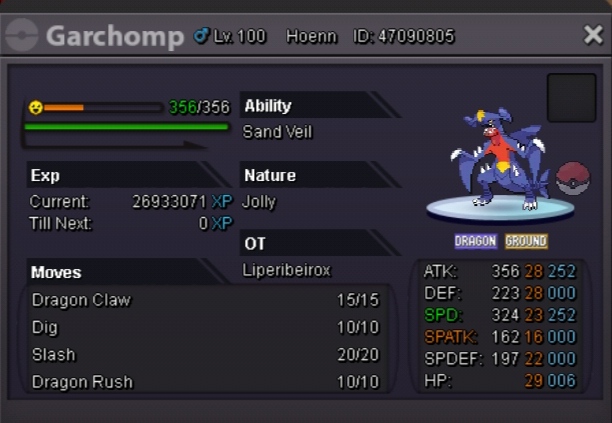
Start price - 200 k Minimum bid - 100 k Instant price - 1.7 million Bid will start after 1st call. And will end after 24 hours of 1st call
-
