




New Trade Zone
Trade Zone is now live
Use the new Trade Zone for auctions and instant-price trades so Pokemon and item offers are easy to find.

P4n1c
Registered User
-
Joined
-
Last visited
Everything posted by P4n1c
-
auction end @Rayondx wins
-
ends in 30 mins
-
c.o is 500k from @Eetaachee didnt see Eetachee's comment , my badAuction Length : 72 hours after 1st bid Start bid 100k min bid 50k
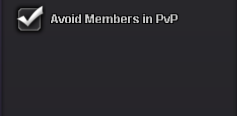
 just like in normal pvp can you give us the option to avoid in rand
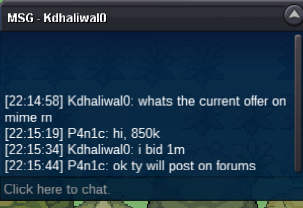
 ill buy jangmo 400k , i have added you on discord (Rambomike)congrtas to @Niarm this post can be closed
 Trade complete , Can be closed
 @Niarm corngrats you wonAuction Start 1m Min bid 100k Ends 48 hours after 1st bid
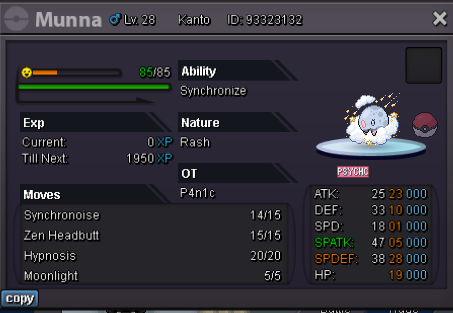 Auction length : 4 days after 1st bid Start Bid : 2 million Minimum Bid :100k Good Luck & Happy Bidding !
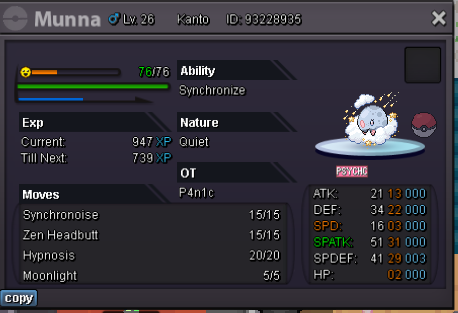 Congrats to nikolajojic you win with a bid of 2.1m I will be online in about 2 and half hours if you'll be on at that time3 day auction (timer will start at 1st bid) Starting bid 1.5million Minimum Bid 100k Good Luck ! Accepted form of payment : Pokedollars, CC -400k , IV reroll 500k , Nature reroll 250kauction complete , (can be removed )
 congrats Boomsmoke you won with 2.6million bid




Account
Navigation
Search
Configure browser push notifications
Chrome (Android)
- Tap the lock icon next to the address bar.
- Tap Permissions → Notifications.
- Adjust your preference.
Chrome (Desktop)
- Click the padlock icon in the address bar.
- Select Site settings.
- Find Notifications and adjust your preference.
Safari (iOS 16.4+)
- Ensure the site is installed via Add to Home Screen.
- Open Settings App → Notifications.
- Find your app name and adjust your preference.
Safari (macOS)
- Go to Safari → Preferences.
- Click the Websites tab.
- Select Notifications in the sidebar.
- Find this website and adjust your preference.
Edge (Android)
- Tap the lock icon next to the address bar.
- Tap Permissions.
- Find Notifications and adjust your preference.
Edge (Desktop)
- Click the padlock icon in the address bar.
- Click Permissions for this site.
- Find Notifications and adjust your preference.
Firefox (Android)
- Go to Settings → Site permissions.
- Tap Notifications.
- Find this site in the list and adjust your preference.
Firefox (Desktop)
- Open Firefox Settings.
- Search for Notifications.
- Find this site in the list and adjust your preference.