




New Trade Zone
Trade Zone is now live
Use the new Trade Zone for auctions and instant-price trades so Pokemon and item offers are easy to find.


Tgbnamish
Registered User
-
Joined
-
Last visited
Everything posted by Tgbnamish
-
bump
-
bump
-
bump
-
bump
-
bump
-
Bump
-
bump,recruting active players 🙂
-
bump
-
Bump
-
Agreed with daica without RNG there is no fun 🙂
-
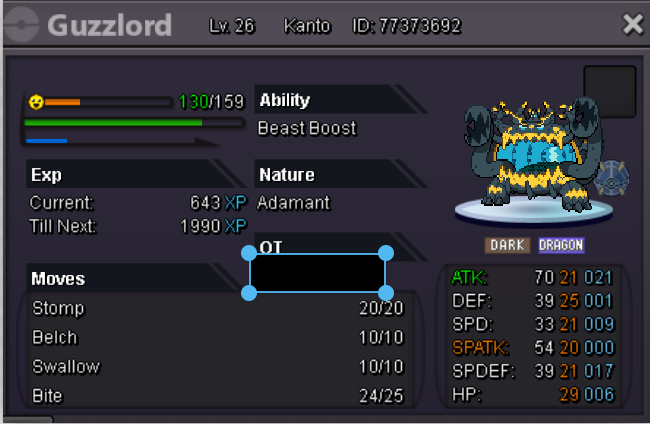
starting offer:2m min bid:500k insta:5m ends in 48hrs after start
-
Ok tysm
-
bump
-
Victini Dungeon Service (Ruins of the Vale Dungeon) 1m for each person To unlock the Victini Dungeon, you must first complete the Crater Town Dungeon Quest; Watch a guide here. Upon successfully finishing the quest, you’ll receive 2 Twin Dragon Orbs as a reward. You need 1 Twin Dragon Orb in order to complete the Victini Dungeon. If you've already used all your Twin Dragon Orbs, you can buy one for 300k. Contact : Ign-Tgbnamish Discord-Tgbnamish#4748
-
my lvl 100 altaria is missing (not my ot though)
-
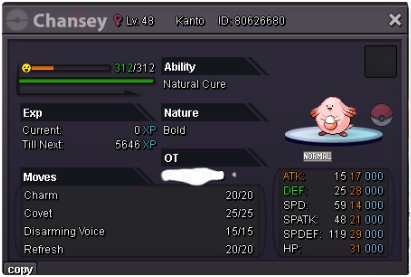
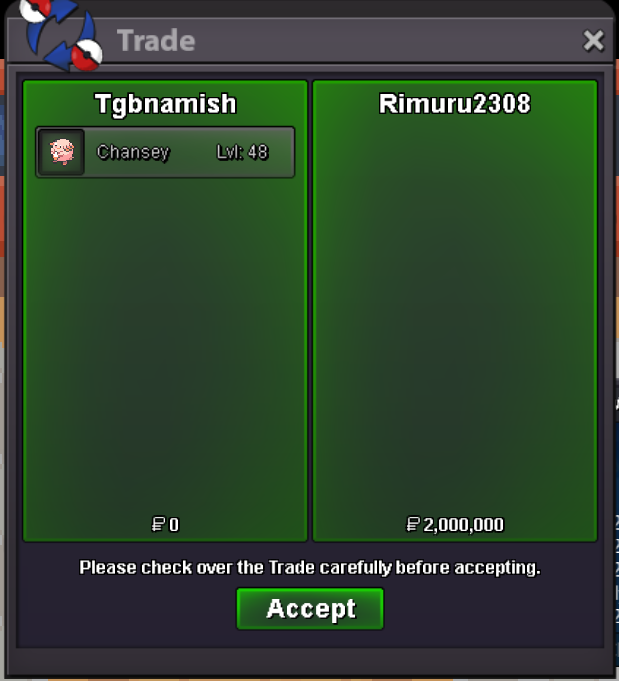
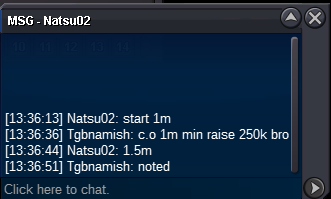
@Ruthlessslayeryou bidded overtime which does not count. @Rimuru2308you won!@Kimew or any trade mode can help me to determine the winner?Starting offer : 1m Min bid : 250k Insta : 5m Ends in 48 hrs after start. Acceptable Payments : Pokedollars
 bumpBumpBumpclosed ty for these memories :))


Account
Navigation
Search
Configure browser push notifications
Chrome (Android)
- Tap the lock icon next to the address bar.
- Tap Permissions → Notifications.
- Adjust your preference.
Chrome (Desktop)
- Click the padlock icon in the address bar.
- Select Site settings.
- Find Notifications and adjust your preference.
Safari (iOS 16.4+)
- Ensure the site is installed via Add to Home Screen.
- Open Settings App → Notifications.
- Find your app name and adjust your preference.
Safari (macOS)
- Go to Safari → Preferences.
- Click the Websites tab.
- Select Notifications in the sidebar.
- Find this website and adjust your preference.
Edge (Android)
- Tap the lock icon next to the address bar.
- Tap Permissions.
- Find Notifications and adjust your preference.
Edge (Desktop)
- Click the padlock icon in the address bar.
- Click Permissions for this site.
- Find Notifications and adjust your preference.
Firefox (Android)
- Go to Settings → Site permissions.
- Tap Notifications.
- Find this site in the list and adjust your preference.
Firefox (Desktop)
- Open Firefox Settings.
- Search for Notifications.
- Find this site in the list and adjust your preference.