




New Trade Zone
Trade Zone is now live
Use the new Trade Zone for auctions and instant-price trades so Pokemon and item offers are easy to find.

Juviaaa
Registered User
-
Joined
-
Last visited
Everything posted by Juviaaa
-
Shiny Cutiefly for Auction Starting price: 15m Min. Bid: 250k Insta: no insta yet Auction will last 72 hours after first bid accepting cc for 400k & reroll 600k Contact me here, ingame or discord Juvi#8905 ===============================
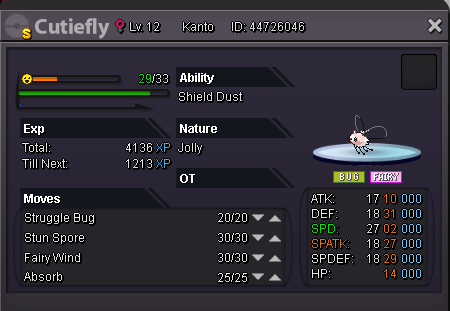
-
bump
-
-
bump
-
-
-
bump
-
bump
-
bump
-
Sold ingame
-
Shiny Torkoal for Auction Starting price: 5.5m Min. Bid: 200k Insta: 8m Auction will last 48 hours after first bid Contact me here, ingame or discord Juvi#8905 ===============================
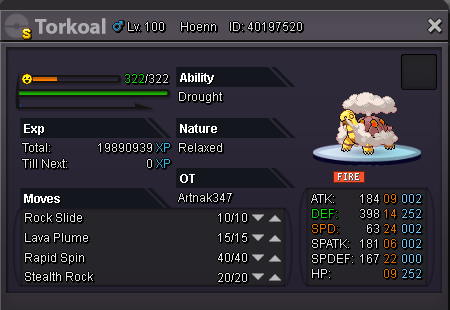
-
-
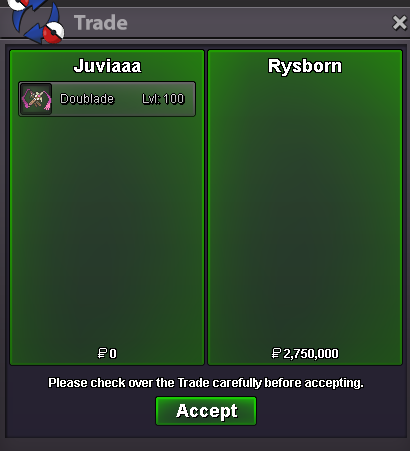
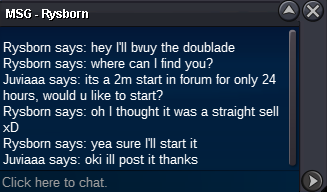
bump 30 mins leftEpic Doublade for Auction Starting price: 2m Min. Bid: 200k Insta: 5m Auction will last 24 hours after first bid Contact me here, ingame or discord Juvi#8905 =============================== sold to (Rysborn)
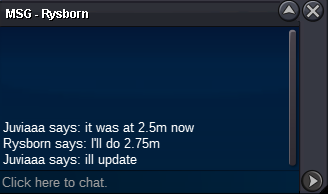
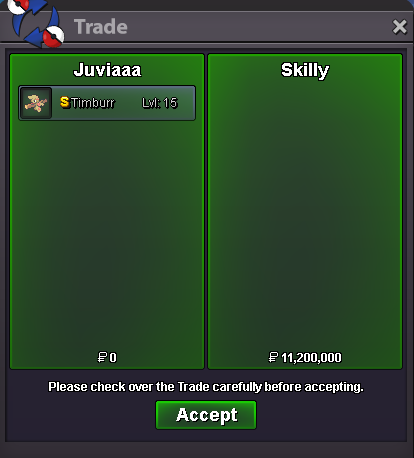
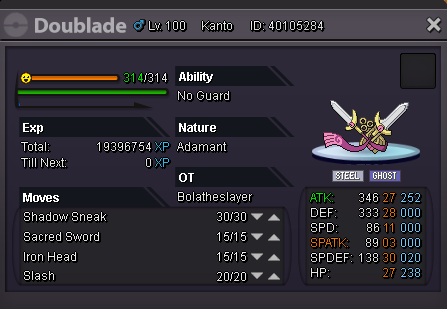 Checking my time stamps and all. I think Skilly won. Last offer was 7:49, was edited at 7:55. where the auction should end at 8:05 and Jeisson offered at 8:15. Following the 15 minute auction if the edit is counted. it should have ended at 8:10. If I'm wrong just revert back the trade, thanks.bump 1 hour and 30 mins leftbumpShiny Timburr for Auction Starting price: 10m Min. Bid: 200k Insta: 15m Auction will last 2 days after first bid Contact me here, ingame or discord Juvi#8905 =============================== c.o 10m (Jeisson5), 1 hour and 30 mins left
 bump
bump


Account
Navigation
Search
Configure browser push notifications
Chrome (Android)
- Tap the lock icon next to the address bar.
- Tap Permissions → Notifications.
- Adjust your preference.
Chrome (Desktop)
- Click the padlock icon in the address bar.
- Select Site settings.
- Find Notifications and adjust your preference.
Safari (iOS 16.4+)
- Ensure the site is installed via Add to Home Screen.
- Open Settings App → Notifications.
- Find your app name and adjust your preference.
Safari (macOS)
- Go to Safari → Preferences.
- Click the Websites tab.
- Select Notifications in the sidebar.
- Find this website and adjust your preference.
Edge (Android)
- Tap the lock icon next to the address bar.
- Tap Permissions.
- Find Notifications and adjust your preference.
Edge (Desktop)
- Click the padlock icon in the address bar.
- Click Permissions for this site.
- Find Notifications and adjust your preference.
Firefox (Android)
- Go to Settings → Site permissions.
- Tap Notifications.
- Find this site in the list and adjust your preference.
Firefox (Desktop)
- Open Firefox Settings.
- Search for Notifications.
- Find this site in the list and adjust your preference.