




New Trade Zone
Trade Zone is now live
Use the new Trade Zone for auctions and instant-price trades so Pokemon and item offers are easy to find.

Sukres
Registered User
-
Joined
-
Last visited
Everything posted by Sukres
-
Bid won by Littlez Closed and ty all for participating
-
-
bump
-
bump
-
request was finished, please ignore this post
-
The bid ends on the 15. of april. The time will be around 11 am UTC +1.
-
whoups wrote this pm by accident q.q
-
Pretty sure people been seein diz clefairy before. It's the standard :) Buying and reselling. I want to start a bid on this cute clefairy. Start bid 300k, increase by 50k. I accept Coin capsules - 330k The bid will end 3 days after the first bidder has been determined.

-
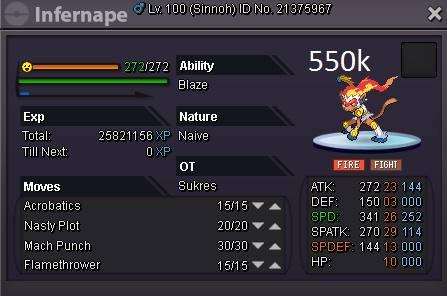
infernape sold
-
pm me ingame
-
yep @zMartnn
-
Excadrill sold ingame.
-
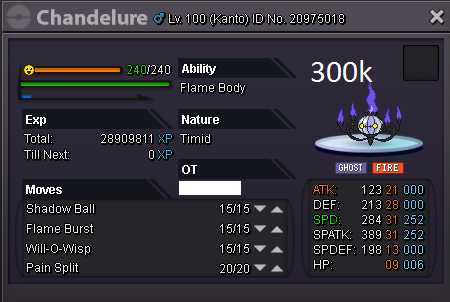
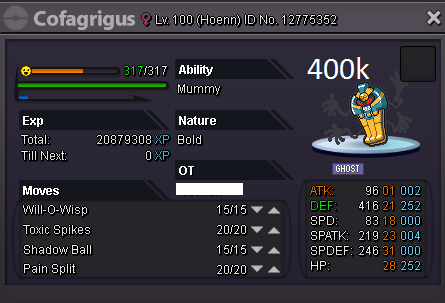
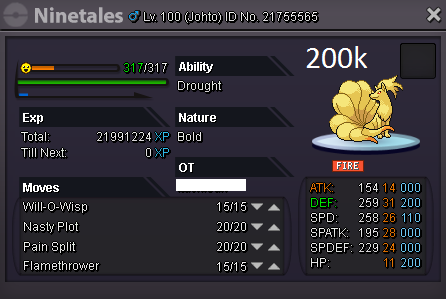
Aight ladies and gentlemen, today I will line up with some pokies, that'll hopefully bring in some money. I'm a man in need. Besides pokedollars I consider serious offers that include trades between Pokemon. I also accept: CC = 330k Small ms = 150k Black ms = 140k





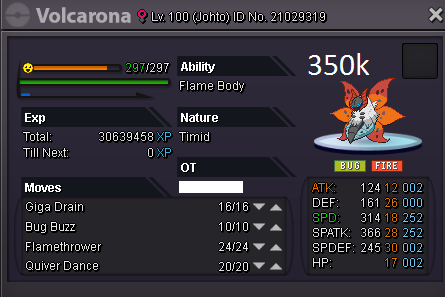
-
1m55
-
oh my bad, i mixed it up
-
we are going to wait for 8 pm UTC +1, please dont extend the bidding time anymore
-
-
The bid will end in 2 hours right? Nightumbreon bid on 6:40 pm UTC +1 while you said there was one day left.
-
-
bid ends in 10 minutes doesnt it
-
700k
-
dude your bid ended
-
anyways 500k bid
-
when does the bid end?
-
250k