




New Trade Zone
Trade Zone is now live
Use the new Trade Zone for auctions and instant-price trades so Pokemon and item offers are easy to find.

Mainroselia
Registered User
-
Joined
-
Last visited
Everything posted by Mainroselia
-
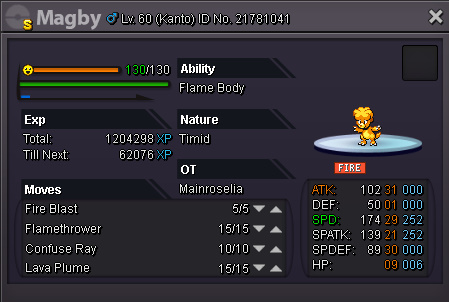
i dont want to talk about mcloit and his friend from his guild :)). The Magby is not sold. And no more auctions for it.Wts 17m (Tier 9 MS PvP Pokémon Timid 29 Speed , 21 Spatk) Only Insta Price.
 yes sorry. mistake happens bro , am just not good at auctions :)). i will sell it without auction , ty for your time.min price of the magby is 15m. and i will never do auction again for it. Ty.You Guys Thinks , you know everything. 1. i said it form the start that i can cancel the auction and i put it in spoiler(idk if it doesnt show up but am sure i put it from the start). 2. i dont have access to magikarp acc , check it if u want. Report me for scam if u want , but guess what , i didnt scammed.to my honest i did a mistake. it ends in 30 min sorry.40 min left7 hours left1 Day Left C.O by Mcloit 7m.2 Days LeftI just Want to AsK One Question :)) What Poke you prefer more from these 5? 1.Charizard 2.Sceptile 3.Pikachu 4.Lucario 5.Gliscor Not Only In Game But in the anime too. (This question is for the new montage that i want to make) ty <33 days leftthenku <3C.O : 9m by @Mcloiit 1 Day Left Raise (Min) : 1m NO INSTA FOR NOW. Good Luck Insta Price : 20m 40 min left
 https://www.youtube.com/watch?v=BS0uOMjO4hE:1New Vid :<305/04/2018 :04/04/2018:


Account
Navigation
Search
Configure browser push notifications
Chrome (Android)
- Tap the lock icon next to the address bar.
- Tap Permissions → Notifications.
- Adjust your preference.
Chrome (Desktop)
- Click the padlock icon in the address bar.
- Select Site settings.
- Find Notifications and adjust your preference.
Safari (iOS 16.4+)
- Ensure the site is installed via Add to Home Screen.
- Open Settings App → Notifications.
- Find your app name and adjust your preference.
Safari (macOS)
- Go to Safari → Preferences.
- Click the Websites tab.
- Select Notifications in the sidebar.
- Find this website and adjust your preference.
Edge (Android)
- Tap the lock icon next to the address bar.
- Tap Permissions.
- Find Notifications and adjust your preference.
Edge (Desktop)
- Click the padlock icon in the address bar.
- Click Permissions for this site.
- Find Notifications and adjust your preference.
Firefox (Android)
- Go to Settings → Site permissions.
- Tap Notifications.
- Find this site in the list and adjust your preference.
Firefox (Desktop)
- Open Firefox Settings.
- Search for Notifications.
- Find this site in the list and adjust your preference.