




Skip to content
View in the app

A better way to browse. Learn more.

Pokemon Revolution Online

A full-screen app on your home screen with push notifications, badges and more.

To install this app on iOS and iPadOS
  1. Tap the Share icon in Safari
  2. Scroll the menu and tap Add to Home Screen.
  3. Tap Add in the top-right corner.
To install this app on Android
  1. Tap the 3-dot menu (โ‹ฎ) in the top-right corner of the browser.
  2. Tap Add to Home screen or Install app.
  3. Confirm by tapping Install.

๐Ÿ”ฅ Volcarona Lv.100 | Flame Body | Fully EV-Trained | Competitive Build | Cross-Server Auction ๐Ÿ”ฅ

ActiveCross-ServerPokemonAuction
Yukaokkotsu Countdown starts with the first qualifying bid.Start price: 1.000.000Auction Time: 2 days after auction startHighest Bidder: -
Start price
1.000.000
Instant price
-
Minimum bid
100.000
Current offer
-

Image of the Pokemon for sale
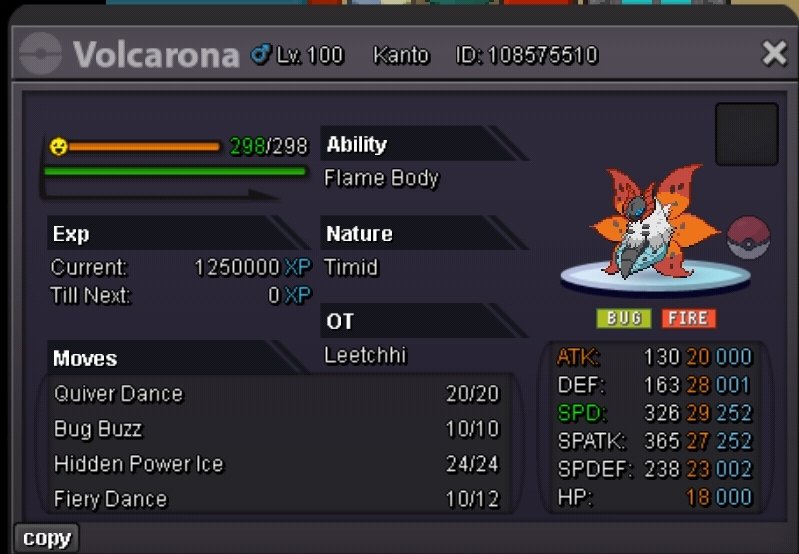
Screenshot_2026-11-01-19-37-03-821_com.PROTeam.PROClient-edit.jpg

๐Ÿ”ฅ VOLCARONA โ€“ CROSS-SERVER AUCTION ๐Ÿ”ฅ

โœฆ LEVEL 100 | COMPETITIVE BUILD โœฆ

โ”โ”โ”โ”โ”โ”โ”โ” POKร‰MON DETAILS โ”โ”โ”โ”โ”โ”โ”โ”

๐Ÿ”ฅ Pokรฉmon: Volcarona

โญ Level: 100

๐ŸŒฟ Nature: Timid

โšก Ability: Flame Body

โ”โ”โ”โ”โ”โ”โ”โ”โ”โ” IV DETAILS โ”โ”โ”โ”โ”โ”โ”โ”โ”โ”

โค๏ธ HP: 18

โš”๏ธ Attack: 20

๐Ÿ›ก๏ธ Defense: 28

๐Ÿ”ฅ Sp. Atk: 27

๐Ÿ’Ž Sp. Def: 23

โšก Speed: 29

โ”โ”โ”โ”โ”โ”โ”โ”โ”โ” EV TRAINING โ”โ”โ”โ”โ”โ”โ”โ”โ”

๐Ÿ”ฅ Sp. Atk: 252

โšก Speed: 252

โ”โ”โ”โ”โ”โ”โ”โ”โ”โ” MOVESET โ”โ”โ”โ”โ”โ”โ”โ”โ”โ”

โ‘  Quiver Dance

โ‘ก Fiery Dance

โ‘ข Bug Buzz

โ‘ฃ Hidden Power Ice

โ”โ”โ”โ”โ”โ”โ”โ”โ”โ” AUCTION INFO โ”โ”โ”โ”โ”โ”โ”โ”โ”

๐ŸŒ Cross-Server: Silver / Gold

๐Ÿ’ฐ Starting Bid: 1,000,000

๐Ÿ“ˆ Minimum Raise: 100,000

๐Ÿ† Fully EV-Trained & Battle-Ready!

๐Ÿ”ฅ Serious bidders are welcome. Happy bidding!

Bid history

Fuckq8 Invalidated by Hizukii
99.999.999
2026-11-09 18:45:46

Account

Navigation

Search

Search

Configure browser push notifications

Chrome (Android)
  1. Tap the lock icon next to the address bar.
  2. Tap Permissions โ†’ Notifications.
  3. Adjust your preference.
Chrome (Desktop)
  1. Click the padlock icon in the address bar.
  2. Select Site settings.
  3. Find Notifications and adjust your preference.