



Skip to content
View in the app

A better way to browse. Learn more.

Pokemon Revolution Online

A full-screen app on your home screen with push notifications, badges and more.

To install this app on iOS and iPadOS
  1. Tap the Share icon in Safari
  2. Scroll the menu and tap Add to Home Screen.
  3. Tap Add in the top-right corner.
To install this app on Android
  1. Tap the 3-dot menu (⋮) in the top-right corner of the browser.
  2. Tap Add to Home screen or Install app.
  3. Confirm by tapping Install.

20+ BULKY HAPPINY

EndedSilverPokemonAuction
143zed EndedHighest Bidder: Kradden87
Auction Ended: Kradden87 won this auction with 660.000 Pokedollars on 2026-08-01 06:33 PM UTC.
Start price
300.000
Instant price
-
Minimum bid
30.000
End price
660.000

Image of the Pokemon for sale
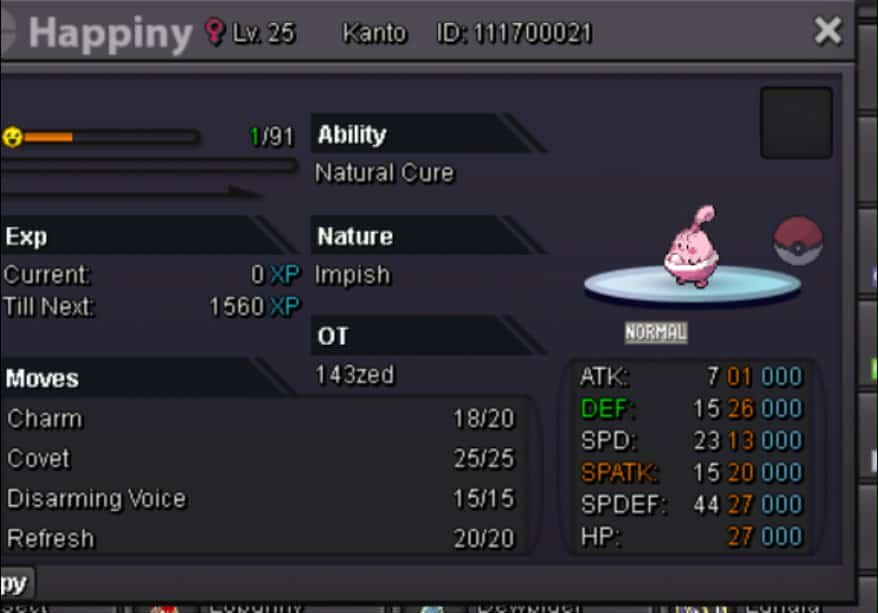
Messenger_creation_F9909E1D-496B-4AE2-B9FD-3C45E5AE1AC9.jpeg

POKEDOLLAR

Bid history

660.000
2026-08-01 18:17:35
Shiddharth
630.000
2026-08-01 18:16:55
600.000
2026-08-01 18:16:30
Shiddharth
540.000
2026-08-01 18:13:53
510.000
2026-08-01 18:11:49
Shiddharth
480.000
2026-08-01 18:07:38
450.000
2026-08-01 18:06:55
Shiddharth
420.000
2026-08-01 18:00:21
390.000
2026-08-01 17:49:55
Shiddharth
360.000
2026-08-01 15:38:09
330.000
2026-08-01 15:26:30
Shiddharth
300.000
2026-07-31 18:03:18

Account

Navigation

Search

Search

Configure browser push notifications

Chrome (Android)
  1. Tap the lock icon next to the address bar.
  2. Tap Permissions → Notifications.
  3. Adjust your preference.
Chrome (Desktop)
  1. Click the padlock icon in the address bar.
  2. Select Site settings.
  3. Find Notifications and adjust your preference.
