



Skip to content
View in the app

A better way to browse. Learn more.

Pokemon Revolution Online

A full-screen app on your home screen with push notifications, badges and more.

To install this app on iOS and iPadOS
  1. Tap the Share icon in Safari
  2. Scroll the menu and tap Add to Home Screen.
  3. Tap Add in the top-right corner.
To install this app on Android
  1. Tap the 3-dot menu (⋮) in the top-right corner of the browser.
  2. Tap Add to Home screen or Install app.
  3. Confirm by tapping Install.

30spd 31atk jolly shellder

EndedSilverPokemonAuction
Nhojyaj28 EndedHighest Bidder: Grizz1612
Auction Ended: Grizz1612 won this auction with 140.000 Pokedollars on 2026-07-12 10:16 PM UTC.
Start price
20.000
Instant price
-
Minimum bid
10.000
End price
140.000

Image of the Pokemon for sale
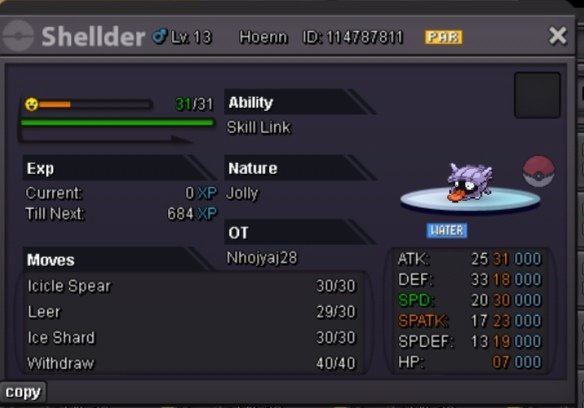
Screenshot_20260711_235056_com_PROTeam_PROClient_UnityPlayerActivity_edit_1234780801368186.jpg

Bid history

140.000
2026-07-12 10:38:39
130.000
2026-07-12 10:38:17
120.000
2026-07-12 10:37:59
110.000
2026-07-12 10:37:50
100.000
2026-07-12 10:37:17
90.000
2026-07-12 10:36:49
80.000
2026-07-12 10:36:37
70.000
2026-07-12 10:35:26
60.000
2026-07-12 10:28:23
50.000
2026-07-12 09:29:49
Mtmazhab007
40.000
2026-07-12 08:38:00
30.000
2026-07-12 06:59:34
20.000
2026-07-11 22:16:45

Account

Navigation

Search

Search

Configure browser push notifications

Chrome (Android)
  1. Tap the lock icon next to the address bar.
  2. Tap Permissions → Notifications.
  3. Adjust your preference.
Chrome (Desktop)
  1. Click the padlock icon in the address bar.
  2. Select Site settings.
  3. Find Notifications and adjust your preference.
