Skip to content
View in the app

A better way to browse. Learn more.

Pokemon Revolution Online

A full-screen app on your home screen with push notifications, badges and more.

To install this app on iOS and iPadOS
  1. Tap the Share icon in Safari
  2. Scroll the menu and tap Add to Home Screen.
  3. Tap Add in the top-right corner.
To install this app on Android
  1. Tap the 3-dot menu (⋮) in the top-right corner of the browser.
  2. Tap Add to Home screen or Install app.
  3. Confirm by tapping Install.

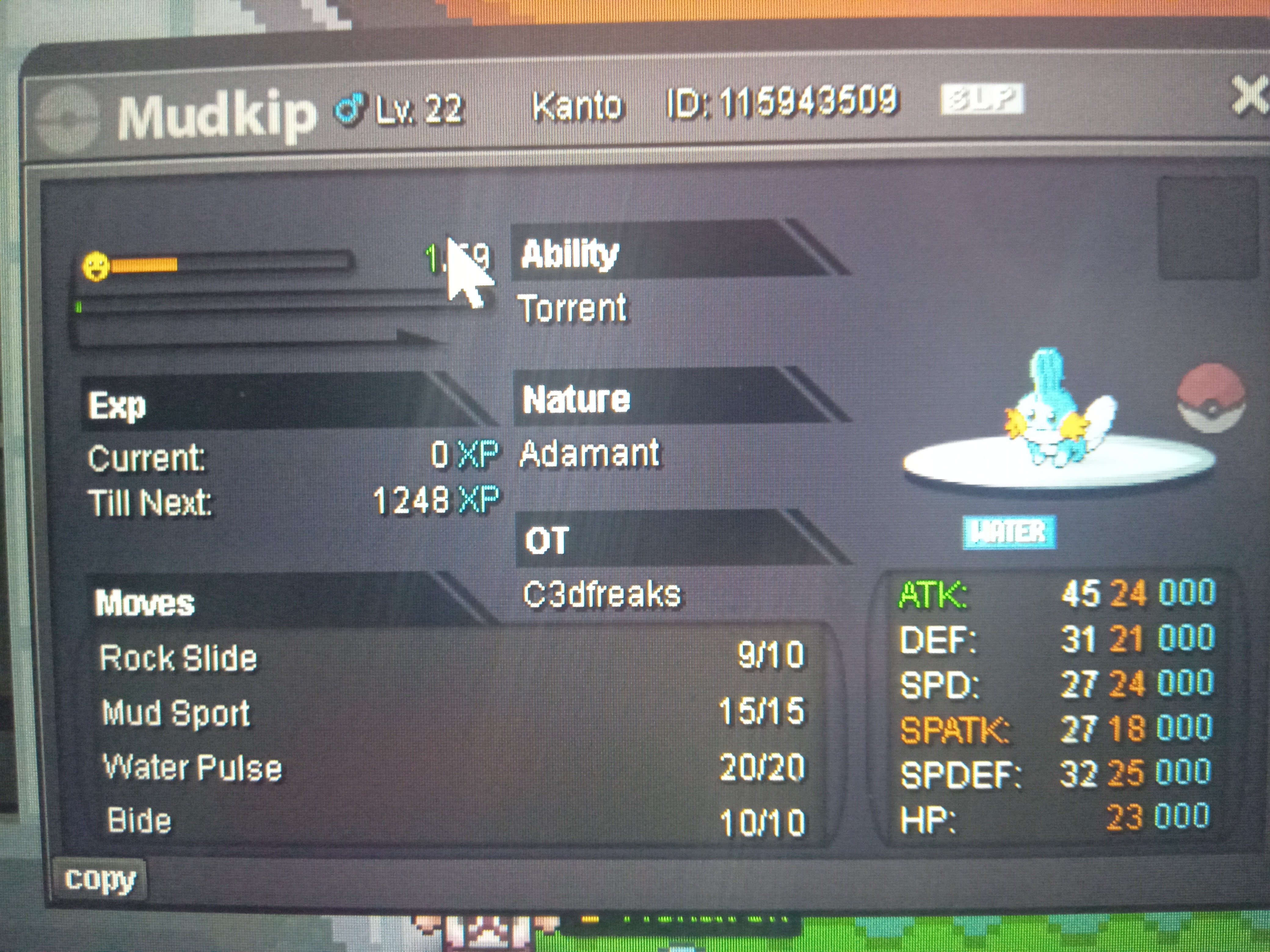
[Auction] 20+ All-Stats Adamant Mudkip | S: 300k | I: 750k

EndedSilverPokemonAuction
Shadymoves EndedHighest Bidder: Mehmetnayo
Auction Ended: Mehmetnayo won this auction with 300.000 Pokedollars on 2026-08-14 01:07 PM UTC.
Start price
300.000
Instant price
750.000
Minimum bid
2
End price
300.000

Image of the Pokemon for sale

17865223691108517727761035424254.jpg

[AUCTION] 20+ All-Stats Adamant Mudkip (Semi-Epic)

Hi everyone, hosting a quick 48-hour auction for this highly competitive Adamant Mudkip. All relevant stats are 21+, making it an excellent "Semi-Epic" foundation for a PvP Swampert.

[Insert your Mudkip image or upload link here]

---------------------------------------------------------

- Start Price: 300,000 $

- Minimum Raise: 50,000 $

- Instant Buy (Insta): 750,000 $

- Auction Duration: 48 Hours after the first valid bid.

---------------------------------------------------------

Accepted Payment Methods:

- Pokedollars ($) Only

Rules & Conditions:

- Sniping rule applies (Bids in the last 15 minutes extend the auction by an additional 15 minutes).

- Fake bids or withdrawing valid bids will be reported to GM staff per forum guidelines.

- Contact me in-game or via forum DM once the auction concludes to finalize the trade.

Happy Bidding!

Bid history

300.000
2026-08-12 13:06:36

Account

Navigation

Search

Search

Configure browser push notifications

Chrome (Android)
  1. Tap the lock icon next to the address bar.
  2. Tap Permissions → Notifications.
  3. Adjust your preference.
Chrome (Desktop)
  1. Click the padlock icon in the address bar.
  2. Select Site settings.
  3. Find Notifications and adjust your preference.