




New Trade Zone
Trade Zone is now live
Use the new Trade Zone for auctions and instant-price trades so Pokemon and item offers are easy to find.

Xlightjz
Registered User
-
Joined
-
Last visited
Everything posted by Xlightjz
-
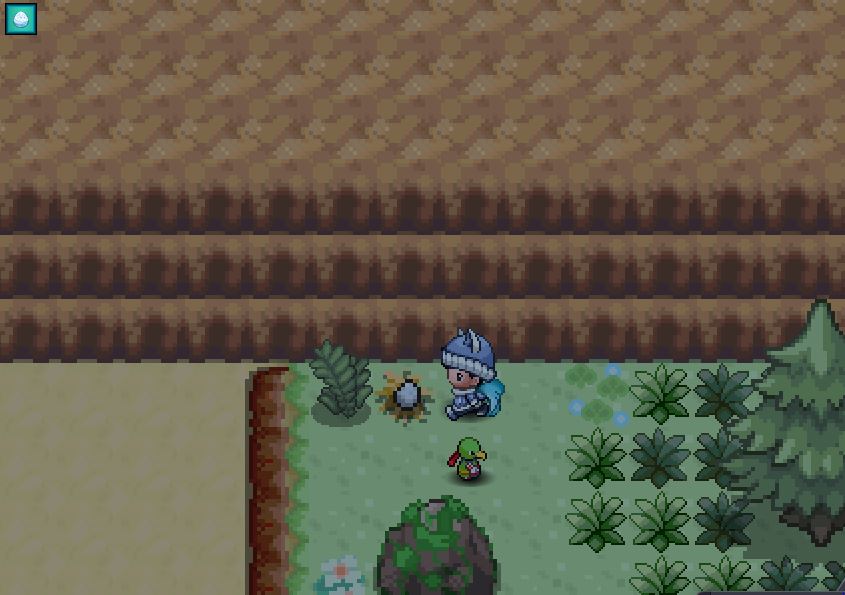
Thanks for the response. I have spoken to the Egg Maniac and have interacted with all other eggs again (except for the one in Route 25, shown in the attached JPG). Unfortunately i have still only got 7 eggs collected apart from the egg in Route 25. The responses in the message box were all about that i have collected them and shouldn't collect the same egg twice. As shown in the picture, i have tried to interact with the egg in Route 25 , but there isn't even an message box popped up saying as if the egg is collected or not. It is just like a normal rock, or a tree. Thanks!
-
I interacted with the Easter egg in Route 25 in Kanto before speaking to the Egg Maniac Yossi to receive the event quest. I then got the Easter quest by speaking to the Egg Maniac and went back to the Easter egg in Route 25 in Kanto. And i was unable to interact with the egg at all. There was not any message box at all, just like interacting as if nothing was there. I have tried relogging in, pressing the refresh button, and even using a different device to log into my account. Currently i have collected every eggs and have received my rewards apart from the final 8th egg on Kanto in which i am stuck with and am unable to collect the egg. Thanks!