




New Trade Zone
Trade Zone is now live
Use the new Trade Zone for auctions and instant-price trades so Pokemon and item offers are easy to find.

Andrewchun
Suspended
-
Joined
-
Last visited
-
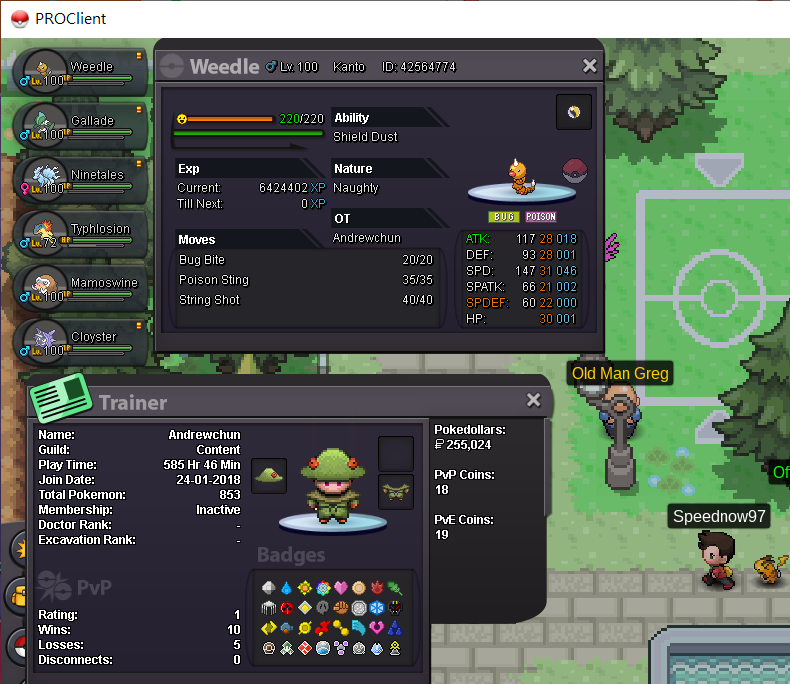
The photo.. I have already evolute before... Can GM help me to downgrade my Weedle to Lv98? Thank you...
-
problem solved. thanksssss
-
This is the second post that reported the same problems.. sorry However, the problem has not solved yet. I have already followed all steps and been to Forest Maze. Checked the trees, mushroom and all of items that I can try but there is no interaction after cheaking. I have spent more than hour but it cannot be solve until now
-
I have already got the Gem from the previous mission in deep sea. And follow all steps from youtube guide, but it still failed
-
it is still failed... I have spent one more hour but can't interact with any objects...
-
i have completed all steps before. But there is no response that I talk with axe. I know it is different for everyone, so, I have checked all the stone and leaf. But nothing happen...

-
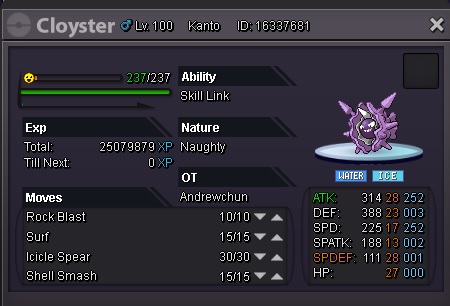
My Closter cannot learn the "Razor Shell" moves from Move Relearner NPC. Before the evolution, the Shellder can learn it through level up... What can I do to re-learn the moves then?
-
The description and power are correct but it becomes 2 times hit in a row.