




New Trade Zone
Trade Zone is now live
Use the new Trade Zone for auctions and instant-price trades so Pokemon and item offers are easy to find.

Karisto
Registered User
-
Joined
-
Last visited
-
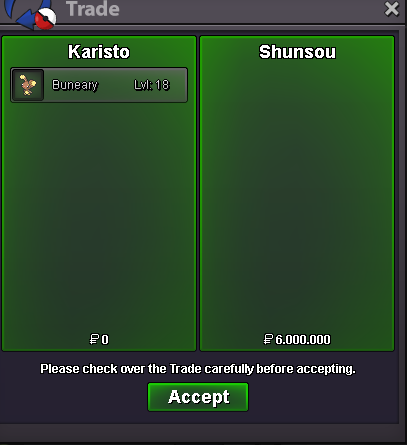
Trade was successful.
-
The Winner is Shunsou with a bid of 6m. Please contact me ingame or Discord. Karisto/Teldas#0626 Karisto
-
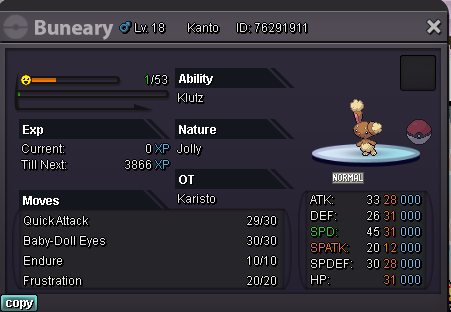
Start Bid is 5 Million min Bid 200k no insta Time: 24h Only Cash
-
silver server° ^^
-
Ja um einiges besser, mein englisch ist etwas schwierig ^^ Ich habe außversehn Registeel gekillt. Dies ist aber schon eine Weile her... ein paar Monate. Nun kam ich wieder zu Pokemon und wollte ihn mir nochmals schnappen. Ich also hin zu Nicola, habe Ihn besiegt. Konnte dann auch die Option auswählen das er Registeel wiederbelebt. Ich also wieder zu Registeel in die Ruinen... aber keiner da. Dann habe ich das Worträtzel nochmals gemacht und versucht den Schlüßel nochmal zu bekommen für die Tür. Doch alles ohne Erfolg. Daraufhin bin ich nochmals zu Nicola, doch dieser sagt mir nur das er 20 Tage braucht um wieder zu kräften zu kommen ^^
-
Hello Pro Team, i have a problem with the Boss Nicola, i kill him and he should respwan my registeel ( i killed it first time ... ^^) . But after killing him and clicking the right. I walk to the spwan from Registeel , but nothing. I do the word Quest with (Steel) again and try to become a new key for the door, but nothing. I hope you can help me. greetings from germany karisto
