New Trade Zone
Trade Zone is now live
Use the new Trade Zone for auctions and instant-price trades so Pokemon and item offers are easy to find.

Nyomz
Registered User
-
Joined
-
Last visited
-
Hello brothers, the mod said u can battle Horon Boss in the north map of Necropolis (after 3 day-cooldown if u had battled him before). U have to win the battle without any poke fainted. Some people also said don't forget to bring ur miracle eye poke and foresight poke. The same thing happened to me, now I am waiting for Horon back and will battle him soon. Good luck bros.
-
Hello brother, the mod said u can battle Horon Boss in the north map of Necropolis (after 3 day-cooldown if u had battled him before). U have to win the battle without any poke fainted. Some people also said don't forget bring ur miracle eye poke and foresight poke. The same thing happened to me, now I am waiting for Horon back and will battle him soon. Good luck bro.
-
up, I also accidentally pick the wrong option and send back to the physycal word, can the quest be restarted please?
-
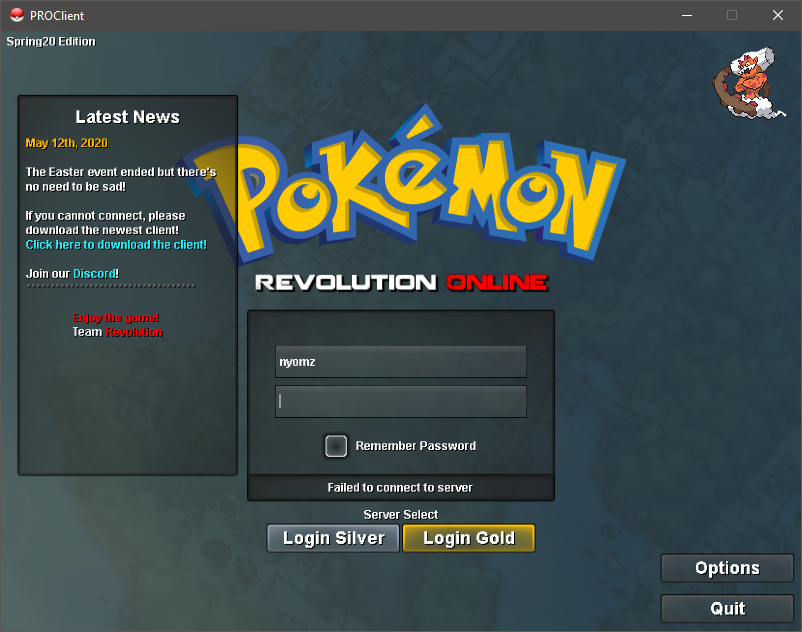
Please help, my friends said I keep come back online and offline in the game, but actually I am not log in, it keep saying failed to connect to the server, this is what happened when I try to log in: My connection is good, my device is good, this is just happened right now. Thank you.