




New Trade Zone
Trade Zone is now live
Use the new Trade Zone for auctions and instant-price trades so Pokemon and item offers are easy to find.

Twint
Registered User
-
Joined
-
Last visited
Everything posted by Twint
-
-
-
BMS paid 120k lost after DC, What i have to do in order to give my back the money?
-
1.7m
-
1.7m
-
1,4m
-
-
-
hi man, are u still selling it?
-
-
-
-
-
Hi players, i'm selling the following pokemon: Umbreon (Sassy - Synchronize): 700k Umbreon (Impish - Synchronize) : 1.3m You can also PM here your offer. Have fun =)

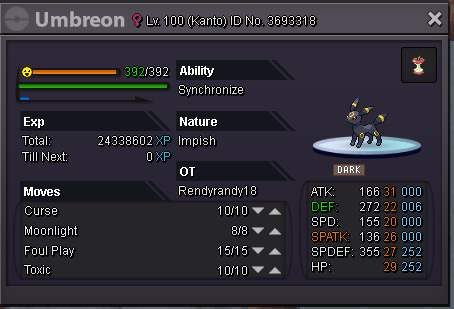
-
-
-
probabily i will not sell it with offer under 1m
-
-
Hi players, i want to sell this epic iv umbreon: great nature and moveset! Post here your offer, good game =)
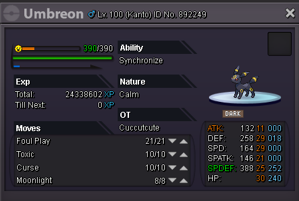
-
up
-
Hi players, i'm looking for these pokes: -Larvitar (Jolly,sand veil, atk+29, spd+29, other stats +20) -Skarmory (impish, sturdy, def+29, hp+29, other stats +20) I have a good budget for each poke (also milions if the poke is really epic). Post here your price, have fun =)
-
up
-
Looking for a modest Greninja with speed iv 29+, sp. atk iv 29+ and other stats 20+. Send a screen shot with your price or contact me in game (TwinT game name). High budget.
-
in game name Twint. I can buy from kanto , jotho and hoenn.