New Trade Zone
Trade Zone is now live
Use the new Trade Zone for auctions and instant-price trades so Pokemon and item offers are easy to find.

Yourpalhaunt
Registered User
-
Joined
-
Last visited
Everything posted by Yourpalhaunt
-
I'm gonna look for that now. Didn't see it earlier.
-
First of all this makes no sense, second of all what?
-
Hello! I would like to report a bug or an issue with my laptop with the new update recently. The announcement on the server appeared, so I went to download the new version and deleted the old one. But, Windows did NOT let me open PRO64.exe because it was dangerous. I added it so it is excluded from Windows Defender and it was still happening. Please help! (I downloaded the MediaFire 64bit version) *I did not know where to put this thread, either in Client Bugs or General Bugs. Feel free to move it to the correct topic.*
-
I didn't mean it in a serious matter, but I was really frustrated while trying to fix it and your post helped a lot!
-
Thank you!
-
You are a life saver. Thank you so much!
-
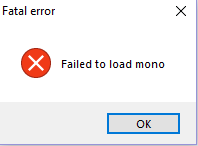
Whenever I try to open the game, it says "Failed to load mono." It worked fine this morning, so I reinstalled the game as a whole and deleted the past version, It is still happening. Help would be very appreciated!