




New Trade Zone
Trade Zone is now live
Use the new Trade Zone for auctions and instant-price trades so Pokemon and item offers are easy to find.

Sagittaiseu
Registered User
-
Joined
-
Last visited
-
Good day, PRO staff! I haven't opened my PRO account in a while and tried to open it today, however, I'm always getting the "Login failed, retrying..." prompt. My friend just created an account today and is currently playing as I am typing this. Is there anyway I can login? Thank you so much!

-
Maybe it is a map problem, should've posted in the mapping bugs. Is there any way to fix this?
-
Thank you so much! I will try to thoroughly delete all PRO files in my PC and reinstall! Edit: I cleared all PRO files (through regedit and the likes) in my PC, downloaded a fresh copy from the website, but the shortcut is still not working. :(
-
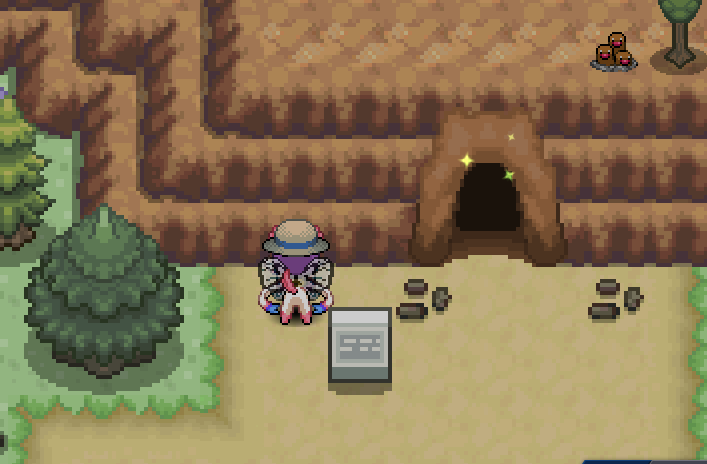
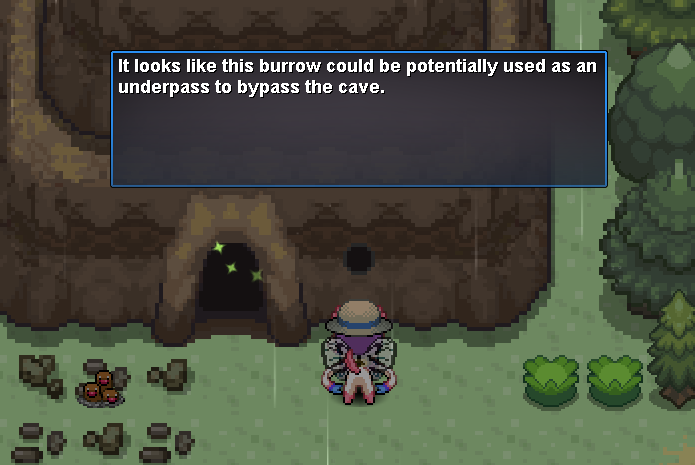
Good day! My cave burrow from Route 2 to Route 11 shortcut doesn't seem to work. It was working well before. I don't know what happened. Route 11 to Route 2 burrow shortcut works fine and usable. My pokemon's happiness is also 174. There are no messages popping up on the screen for me to use the Route 2 burrow. Is there anything I can do about it?
-
☼ Application ☼ 1. What's your Player name? - My player name is Sagittaiseu. 2. Number of hours played? - I have played PRO for 69 hrs and 19 mins. 3. What's your favorite Pokemon? - My favorite Pokemon is Ninetales. 4. How old are you? - I am 21 yrs old.