




New Trade Zone
Trade Zone is now live
Use the new Trade Zone for auctions and instant-price trades so Pokemon and item offers are easy to find.

Licorice
Registered User
-
Joined
-
Last visited
Everything posted by Licorice
-
After scraping through the Forest Maze boss fight, after each loss he would full heal my pokemon. I finally won with last pokemon (Jolteon) who died simultaneously to life orb damage. I was victorious and given the forest orb/gem thing, but then had 6 fainted pokemon in party. I just roped back to pc but was told to make a post here.
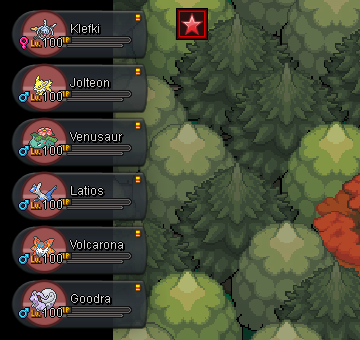
-
Licorice - silver
-
So I played PRO back when Red and Blue server were running instead of Silver and Gold, and when I came back all my pokes were gone, and I assumed they were long gone and irretrievable. Fast forward a week or two, some kind soul helps me find a way to bring my old pokes to the new server, however they ended up on Silver, instead of Gold where all the cool cats I've become friends with are. Is there any way to solve this? I'm aware this might be the kind of problem that either has no fix, or can only be fixed by an admin of sorts. Any help would much appreciated! :)
-
you can also find dawn stones and the rock slide tm while digging!
-
I don't know if there's plans already, or if the suggestion has been made already, but I think it would be a great idea to have tags on pokemon that indicate what region they were caught in. It's easy to tell you caught a heracross in johto, or a scyther from kanto, but pokemon that are available in both regions get mixed up easily in your pc. It would make identifying which pokemon you could sell in kanto or johto easier, and even more so once more regions get added to the game. :]
