




New Trade Zone
Trade Zone is now live
Use the new Trade Zone for auctions and instant-price trades so Pokemon and item offers are easy to find.


Sayainji
Registered User
-
Joined
-
Last visited
Everything posted by Sayainji
-
bump 3 days and 5 hours left ^^
-
4 days and 14 hours left
-
bump less than 6 days left
-
LOL well yeah I'm going to leave the party too, i have things to do, was fun though
-
2,6M
-
2,2M Scizor let's goooo
-
2M scizor
-
1,55 M scizor
-
yes let's not 😄 lol GL to you too ^^ 1,3M scizor
-
1,1M Scizor
-
900K Scizor
-
800K scizor
-
-
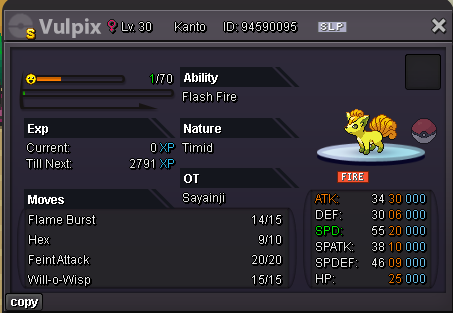
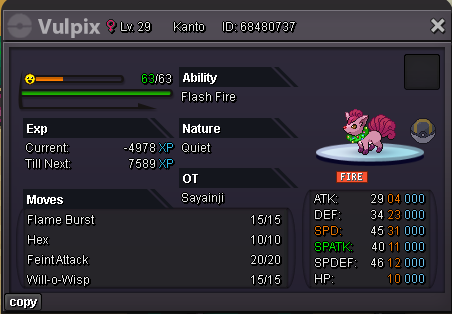
Hello! Today I've decided to sell this cute little puppies bundle, it contains many forms even Shiny 😄 As you can see they are all my OT ^^ Start Price: 50K Min Raise: 50K End Point: 7 Days after first bid. Payment: Pokedollars, Coin Capsules (x1 Coin Capsule = 400k), IV Reroll Tickets (x1 IV Reroll Ticket = 500k) No insta Both servers are able to bid I will transfer to the winner. If a bid is received in the final 15 minutes of the auction, the end point will be delayed by 15 minutes from that bid, and will be delayed by 15 minutes for each new bid thereafter, until the current offer has been held for a full 15 minutes. Good luck! and have fun, happy bidding :3 Countdown : https://countingdownto.com/?c=5810605

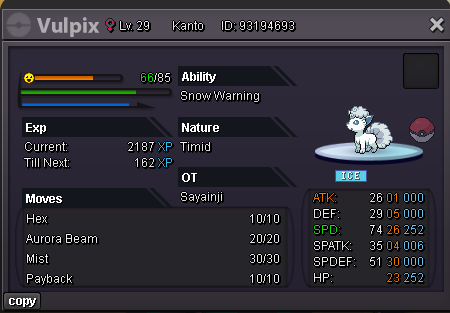
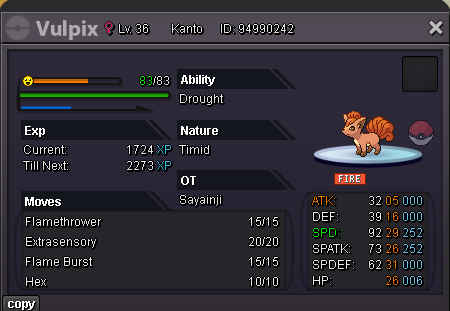
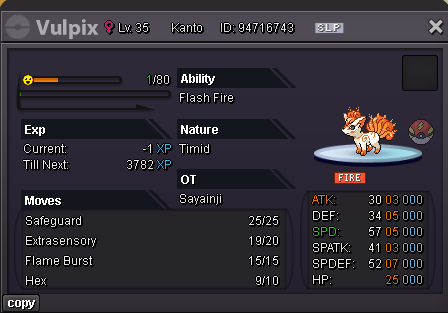
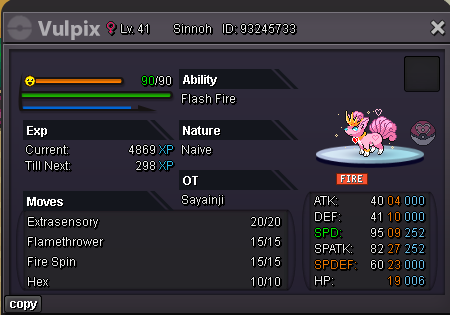
-
bump 🙂
-
Sorry, i said Adamant
-
WTB Godly Azumaril or maril Huge power Adamant, does not matter if trained or not. Ty
-
the picture does not appear
-
. please close this
-
400K Shroom
-
300K shroomish
-
@Viscabarcaa i won the charizard?
-
950K char
-
I just noticed that the auctioner account is suspended... can a Trade mod please force this trade? thank you
-
start
