




New Trade Zone
Trade Zone is now live
Use the new Trade Zone for auctions and instant-price trades so Pokemon and item offers are easy to find.


Sayainji
Registered User
-
Joined
-
Last visited
Everything posted by Sayainji
-
Only one hour left ! Good luck ^^
-
Bump : only 24 hours left exactly ^^ Good luck !
-
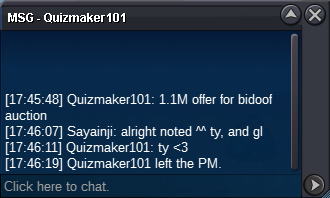
C.O 1.1 M now
-
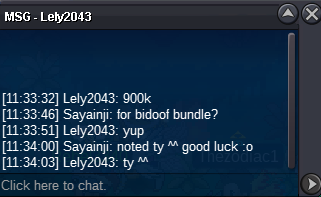
C.O is now 900K
-
Bump : 48 hours left
-
Added count down timer : https://countingdownto.com/?c=5246567 good luck to all participants
-
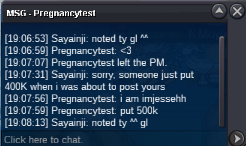
C.O is 500K now
-
1,150 M
-
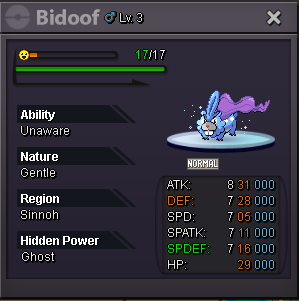
Our lord and Savior Bidoof has ascended. He died for our sins in all his shapes and forms. We celebrate Bidoof's church opening by giving our respect to Lord Bidoof. After 72 hours (duration of auction after first bid) only one lucky person will be the chosen one and receive the Blessing of Lord Bidoof. Shiny Bidoof , ValentineBidoof , Suidoof, Raidoof, Endoof Bundle S.O 100K Min bid 100K, no insta ends after 72 hours of first bid Do you have what it takes to pay respect to Lord Bidoof? Will you be the chosen one? Enjoy your time at Bidoof Church, have fun and good luck to all participants. Edit : Added the link for countdown timer for all participant to know when it ends : https://countingdownto.com/?c=5246567

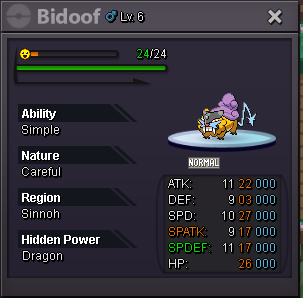
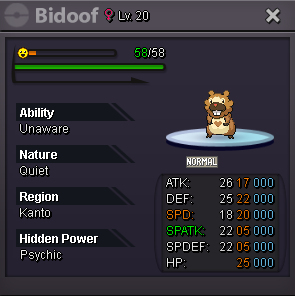


-
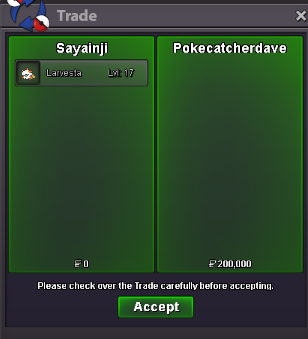
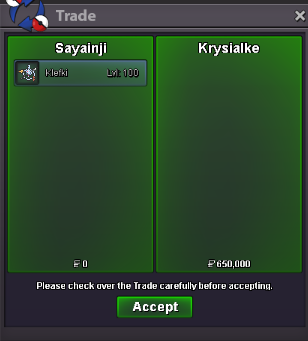
@Pokecatcherdave wins Tangela for 200K , please contact me in game15 minutes left for Tangela, any bid from this point will extend the auction another 15 minutes. - Forum: If a bid is received in the final 15 minutes of the auction, the end point will be delayed by 15 minutes from that bid, and will be delayed by 15 minutes for each new bid thereafter, until the current offer has been held for a full 15 minutes. Must be accurate to the minute that the auction is set to end. › e.g. If the auction ends at 15:00, it will end at 15:00:00. If a late bid is received in the final 15 minutes, at 14:46, the auction will end at 15:01. If another user bids at 15:00, the auction will be extended again, and will end at 15:15, this will be repeated until the current offer has been held for a full 15 minutes.35 minutes left for Tangela C.O 200K .Less than 6 hours left for Tangela c.o 200K@Pokecatcherdave wins larvesta for 200K15 minutes left for Larvesta - Forum: If a bid is received in the final 15 minutes of the auction, the end point will be delayed by 15 minutes from that bid, and will be delayed by 15 minutes for each new bid thereafter, until the current offer has been held for a full 15 minutes. Must be accurate to the minute that the auction is set to end. › e.g. If the auction ends at 15:00, it will end at 15:00:00. If a late bid is received in the final 15 minutes, at 14:46, the auction will end at 15:01. If another user bids at 15:00, the auction will be extended again, and will end at 15:15, this will be repeated until the current offer has been held for a full 15 minutes.7 hours left for Tangela C.O 150K, 2 hours left for Larvesta 150K C.O@Krysialke win klefki with 650KKlefki 650K c.o
 15 minutes left for Klefki - Forum: If a bid is received in the final 15 minutes of the auction, the end point will be delayed by 15 minutes from that bid, and will be delayed by 15 minutes for each new bid thereafter, until the current offer has been held for a full 15 minutes. Must be accurate to the minute that the auction is set to end. › e.g. If the auction ends at 15:00, it will end at 15:00:00. If a late bid is received in the final 15 minutes, at 14:46, the auction will end at 15:01. If another user bids at 15:00, the auction will be extended again, and will end at 15:15, this will be repeated until the current offer has been held for a full 15 minutes.Klefki c.o 550K now
 Klefki 500K c.o now
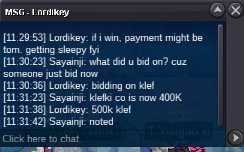 Klefki c.o 400K, Tangela c.o 150K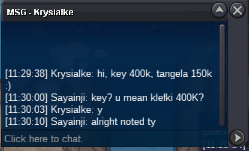


Account
Navigation
Search
Configure browser push notifications
Chrome (Android)
- Tap the lock icon next to the address bar.
- Tap Permissions → Notifications.
- Adjust your preference.
Chrome (Desktop)
- Click the padlock icon in the address bar.
- Select Site settings.
- Find Notifications and adjust your preference.
Safari (iOS 16.4+)
- Ensure the site is installed via Add to Home Screen.
- Open Settings App → Notifications.
- Find your app name and adjust your preference.
Safari (macOS)
- Go to Safari → Preferences.
- Click the Websites tab.
- Select Notifications in the sidebar.
- Find this website and adjust your preference.
Edge (Android)
- Tap the lock icon next to the address bar.
- Tap Permissions.
- Find Notifications and adjust your preference.
Edge (Desktop)
- Click the padlock icon in the address bar.
- Click Permissions for this site.
- Find Notifications and adjust your preference.
Firefox (Android)
- Go to Settings → Site permissions.
- Tap Notifications.
- Find this site in the list and adjust your preference.
Firefox (Desktop)
- Open Firefox Settings.
- Search for Notifications.
- Find this site in the list and adjust your preference.