




New Trade Zone
Trade Zone is now live
Use the new Trade Zone for auctions and instant-price trades so Pokemon and item offers are easy to find.

Flowerfall
Registered User
-
Joined
-
Last visited
Everything posted by Flowerfall
-
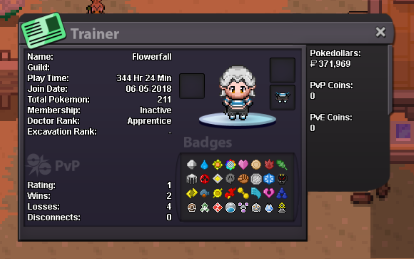
1. Why do you want to join Team Cosmic ? Ive been playing PRO for a while and yet to join an active guild, I have joined one in the past however none of the members were active. I would love to make more friends on PRO as well and help out in anyway i can. 2. Have you ever been banned in PRO, and why? no 3. what are your goals in PRO? my current goals are to complete my pokedex and collect and PvP train one of every dragon type pokemon. 4. How old are you and other than English, what languages do you speak? 20, and no other languages than English 5. What is your discord name and ID tag number? FlowerFall#0401 6. Provide a screenshot of your Trainer Card.
-
Application 1. What's your Player name (IGN)? Flowerfall 2. Number of hours played? 344 3. What's your favourite Pokemon? Mudkip 4. What country are you from? Australia 5. How old are you? 21 6. When's your Birthday? (Optional)
-
I need to get to Snowpoint City in Sinnoh, but i can't seem to due to a Steelix and Onix in Mt Coronet blocking my path. I not sure if I've done something wrong, but I've been to lake Verity and Rowan as told me to go to Lake Acuity up north.