New Trade Zone
Trade Zone is now live
Use the new Trade Zone for auctions and instant-price trades so Pokemon and item offers are easy to find.

Slick
Registered User
-
Joined
-
Last visited
-
2.5m
-
-
Thank you very much!!! it works now perfect, i really thank you <3
-
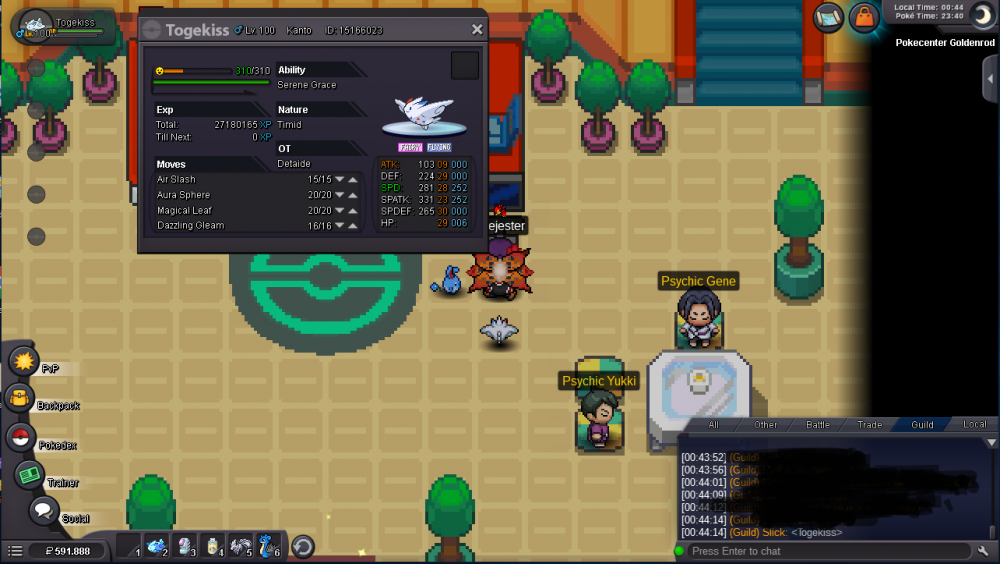
A bit before server went down this May 1st, i was lending a poke to a friend, but when we clicked Accept in "Lend message", server went down; when I finally connected an hour later, i see my Togekiss is still in my boxes, but when i flexed it into guild chat i saw its in "Lended Mode" and i can't see the "send back" button, please i need help with this, i let screen below I hope you can help me with this Thanks!!
-
1.3m
-
I'm online now
-
Auction for Cofagrigus finished, sold to Selka add me in-game as "Slick"
-
Add me in-game as "Slick" i'm online
-
Added to C.O too
-
auction for cofa started with Selka, ends at 00:01 Dec-15th
-
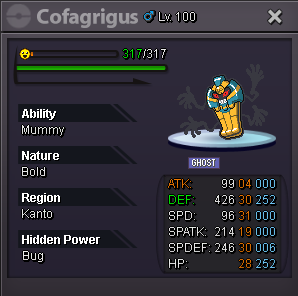
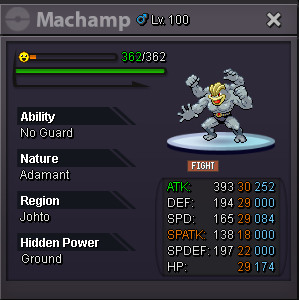
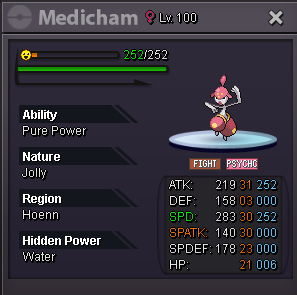
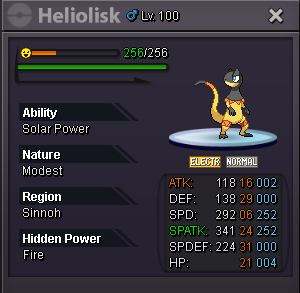
Cofagrigus S.O: 1.5m Insta: 5m C.O: SOLD Selka Machamp S.O: 300k Insta: 600k C.O: SOLD Flint1 Golurk S.O: 250k Insta: 500k C.O: Medicham S.O: 200k Insta: 400k C.O: Insta sold to [uSER=2157978]iNooKii[/uSER] Heliolisk S.O: 250k Insta: 450k C.O: C.O will be added as soon as possible Offers can be done in this post or by pm in-game Accept cc=250k

-