




Skip to content
View in the app

A better way to browse. Learn more.

Pokemon Revolution Online

A full-screen app on your home screen with push notifications, badges and more.

To install this app on iOS and iPadOS
  1. Tap the Share icon in Safari
  2. Scroll the menu and tap Add to Home Screen.
  3. Tap Add in the top-right corner.
To install this app on Android
  1. Tap the 3-dot menu (⋮) in the top-right corner of the browser.
  2. Tap Add to Home screen or Install app.
  3. Confirm by tapping Install.

Xmaskman

Registered User
  • Joined

  • Last visited

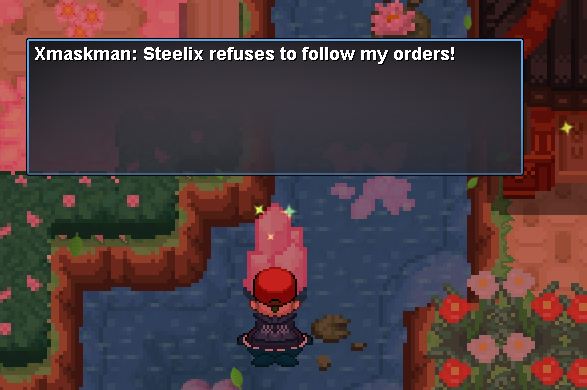
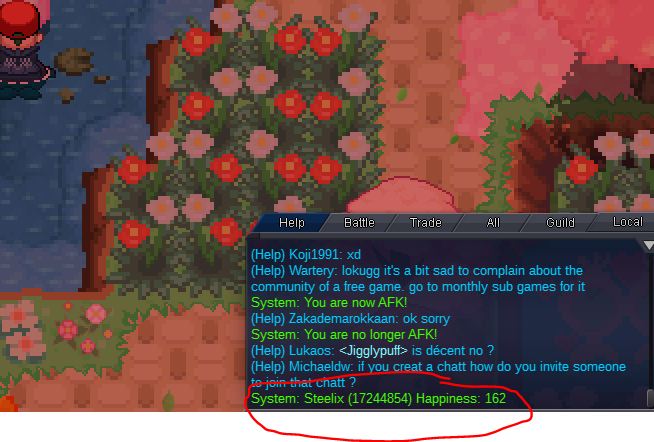
  1. Sir. I have a problem regarding my steelix, he is go back to not following my order using rock smash but it has 162 happinessand i didnt trade him. and i use his other ability like dig and headbutt, i posted this problem in help section in game and Sir / Maam Armin told me that i post it here in gen. support.hope you will help me. Thx in advance. Im a PC use btw.
Account

Navigation

Search

Search

Configure browser push notifications

Chrome (Android)
  1. Tap the lock icon next to the address bar.
  2. Tap Permissions → Notifications.
  3. Adjust your preference.
Chrome (Desktop)
  1. Click the padlock icon in the address bar.
  2. Select Site settings.
  3. Find Notifications and adjust your preference.