




New Trade Zone
Trade Zone is now live
Use the new Trade Zone for auctions and instant-price trades so Pokemon and item offers are easy to find.


Agresivity
Registered User
-
Joined
-
Last visited
Everything posted by Agresivity
-
akatsuki robe, usable for both genders.
-
2.8
-
2.5
-
2.3m
-
550
-
start
-
250
-
would you accept 500k for diggersby?
-
900
-
then 900??
-
Reroll ticket for heracross?
-
1.3
-
1m
-
800
-
600
-
1.3 dab
-
400k dratini
-
Price porygon2?
-
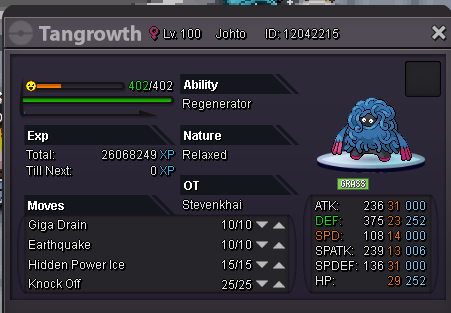
Start: 2,5M Insta: will be added a bit later. Time: 2 days from first bid. Min ris. 100k. Gl everyone
-
buying second one for me
-
i won?
-
1.3
-
i want milotic <3
-
PLAYER CATEGORY Smartest: Komata Friendliest: Astro Funniest: Astro Coolest: Destro16 Comeback Player of the Year: Komata Most Talkative: Kiley Most Trustworthy: Astro Most Helpful: Waleed1301 Most Missed: Komata Most Influential: Destro16 Most Intriguing: Kiley Most Experienced Player: Destro16 Best/Funniest Username: lovemepls Most Professional Guide Maker: Waleed1301 Most Professional Discord Moderator: monhuntress STAFF CATEGORY Best Mapper: Tempa Best Artist: Camilovic Best Content Scripter: Firling Best Community Coordinator: Keita Best Moderator: Rise Best Trade Moderator: Tigerous Best Tester: Whitebaron Best Game Master: Epiales Best Admin: Red Best Developer: Shaolan Best Staff Username: HappyMango Most Professional Staff: Keita Most Dedicated Staff: Keita Funniest Staff: Red Friendliest Staff: Firling Most Honorable Former Staff: Cie Most Missed Former Staff: Letrix
-
Is reroll of ivs not nature, can you log in-game and go to evergreen pc to make the trade?
