New Trade Zone
Trade Zone is now live
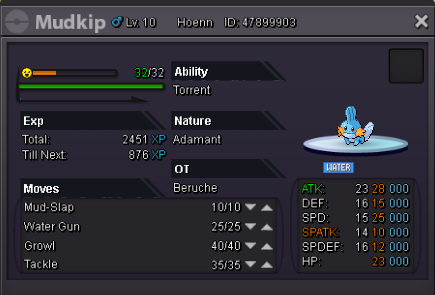
Use the new Trade Zone for auctions and instant-price trades so Pokemon and item offers are easy to find.

Beruche
Registered User
-
Joined
-
Last visited
-
@ChaHaein has won the auction. congrats 🙂
-
up^ 2 hours left
-
-
-
The auction started by ChaHeain. It’s going to end in 72 hours
-
2,6 m2.4 m by BerucheHello again @Maisa, I've been waiting for 3 months 🙂 I know you're busy but I just wondered is that any new about my bug? Also I talked to Agresivity (our guild leader) about it but there is no answer yet. Should I wait more or do we have something to do? Thanks.1m 300k to start auction , 100k min. bid 3 day auction You can pm me from; Discord: Beruche#7660 IGN: Beruche
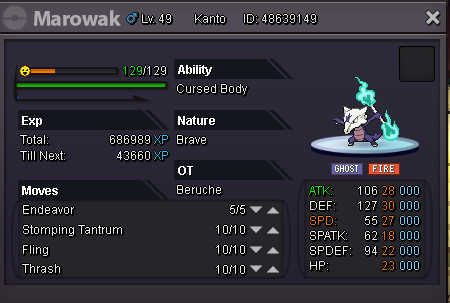 Auction starts at first bid and runs 2 days S.O - 1.9 m min raise: 100k ING: Beruche Discord: Beruche#7660
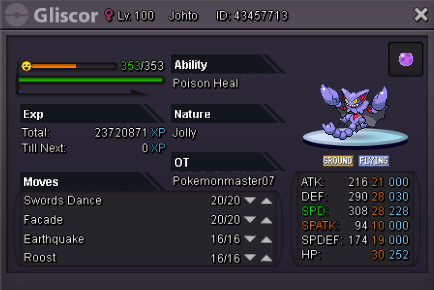 I'm selling this Gliscor for 2,5 m or can trade for epic impish one. Game: Beruche Dc: Beruche#7660 Thanks for intrest.
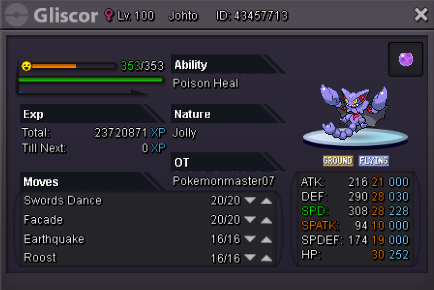 I want to buy a Jolly h.a epic gliscor +24. You can pm me from game, here or discord IGN: Beruche DC: Beruche #7660 Thank you.Dear PRO Staff, I am still waiting for 1 montrhs. (a reply to fix my bug). Again... I tested this bug on couple of computers and still don't see the ice type mark. BUT I tested all pokemons and I see the ice type mark on WEAVILE and ABOMASNOW. I don't know why? Looking forward to your reply again.Looking for offers. You can make offer right here or can contact me on dc. Beruche #7660 Thanks for intrest.