New Trade Zone
Trade Zone is now live
Use the new Trade Zone for auctions and instant-price trades so Pokemon and item offers are easy to find.

Foxpaw
Registered User
-
Joined
-
Last visited
Everything posted by Foxpaw
-
Hello there, Thanks for the help. I understand now how to approach it. I'll update this reply when I manage to log in.
-
Hi there, I've tried all your steps and solutions. How do I check if my account is verified or not? (My forum account says it is verified). If there's any problem with that please notify me and advise. I've downloaded the latest client as well to no success.
-
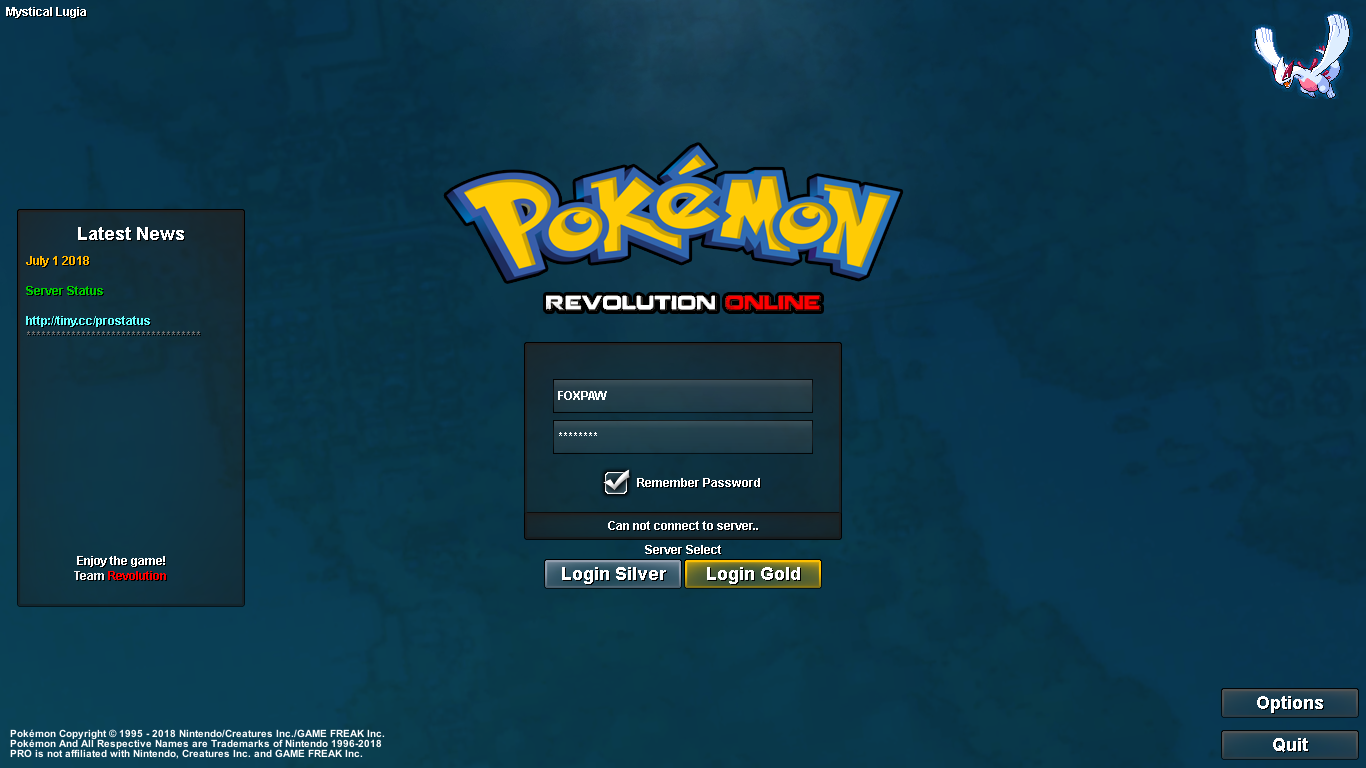
Hello there. This is the message I receive when I try to connect. I'll try some fixes stated here but ultimately the game does not crash. I believe it's a connection issue to do with players creating new accounts. I've seen 3 other threads made this week with the same circumstances and problems. Please see the screenshot provided and advise on further action. I really look forward to playing this game.

-
I've updated my graphics card and Windows to no avail. Which compatibility mode should I be running it in?
-
Hello there, I'm a new user, recently registered. I've downloaded the client and added an exception to my firewall. I've verified my email and checked the server status. I've been advised by the discord that something is stopping my connection to the server. I can't identify the problem and am requesting some help with this issue. Please respond.