New Trade Zone
Trade Zone is now live
Use the new Trade Zone for auctions and instant-price trades so Pokemon and item offers are easy to find.

Riranta
Suspended
-
Joined
-
Last visited
Everything posted by Riranta
-
1m for venusaur
-
800k venusaur
-
500k venusaur
-
venusaur 200k!
-
if u have it please inbox me on forum or ingame!
-
sorry i cant online that time can u online now?
-
now i have it when can we trade?
-
hmm i just have 950k left
-
450k!~
-
i want to buy that tyran for 900k can u sell it to me??
-
do u still have it?
-
where can i check that graphical drivers and operating systems?
-
im using pc now? so what thing can i do to fix it? please
-
i downloaded the new clients but its still not fix that bug yet.
-
oh so ty for your help.
-
i did all of it before but it still not work.
-
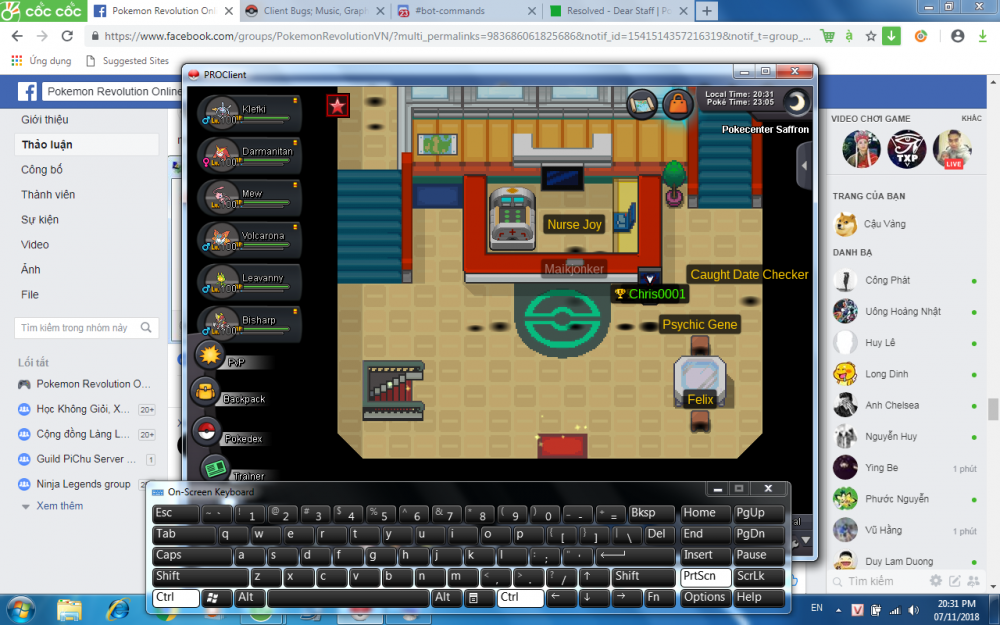
I thinks there was a bug in my client , i cant see anyother person and me too in the game. I just saw the shadow under their character. Please help me to fix it and i cant see anything when i surf now
-
-
Why am i lost all of the balls except the normal pokeball? Please help me to find it!