New Trade Zone
Trade Zone is now live
Use the new Trade Zone for auctions and instant-price trades so Pokemon and item offers are easy to find.

Wiwot
Registered User
-
Joined
-
Last visited
Everything posted by Wiwot
-
sorry already sold, the bid ended
-
500k c.o ,10 hours left
-
up
-
Contrary hp ground(for gengar and heatran) 27 speed(outspeeed gengar) Serperio Starting Bid : 400k Min raise: 100k insta: 2M Bid duration: 2 days from 1st offer

-
rotom sold, price updated, the bid starts today, 2 days left, if no offer the post will be cancelled
-
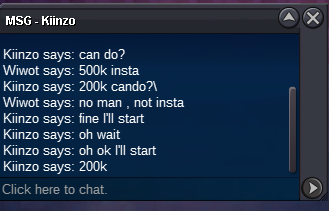
rotom sold to kiinzo for 200k
-
12 hours left for rotom
-
Kiinzo start the bid for rotom-wash, i decide only 1 day the duration.
-
-
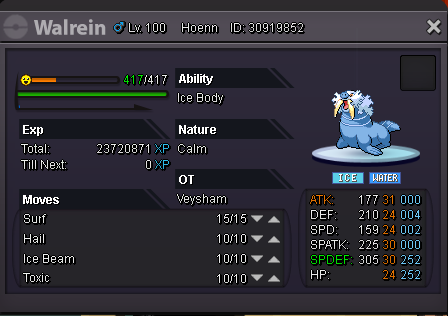
2 days of bid, for each bid starting from first offer 31 speed hp ice alakazam, starting offer 200k, min raise 50k, 400k insta 24+ Walrein, starting offer 100k, 250k insta

-
-
-
perfect ;) i will connect tomorrow, is it a problem?
-
300k
-
250k
-
-
start
-
hi, could i start with 400k?
-
start
-
1,2M
-
sold insta to GengarLv100
-
insta add: 1 M
-
If the bid won't satisfy my request, it will be cancelled
-
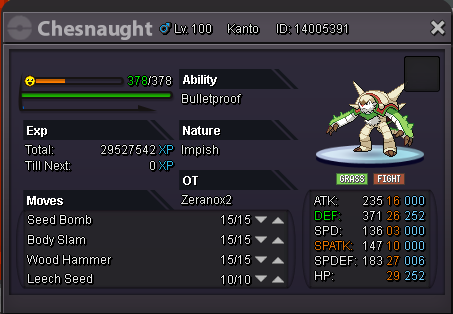
starting bid: 300k min raise: 50k insta: will be inserted in the last day Bid duration: 3 day
-
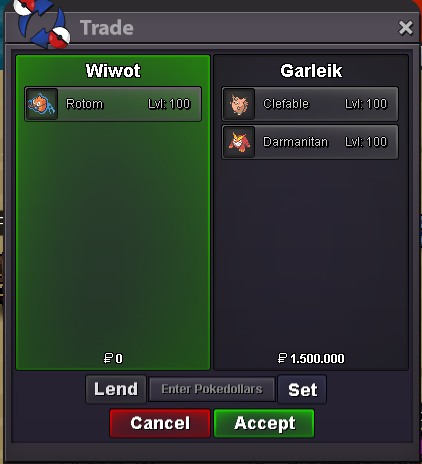
sold insta to Garleik for 3M = 1,5 cash, 800k clefable, 700k darmanitan, thank you to everybody