New Trade Zone
Trade Zone is now live
Use the new Trade Zone for auctions and instant-price trades so Pokemon and item offers are easy to find.

Chasewolf02
Suspended
-
Joined
-
Last visited
Everything posted by Chasewolf02
-
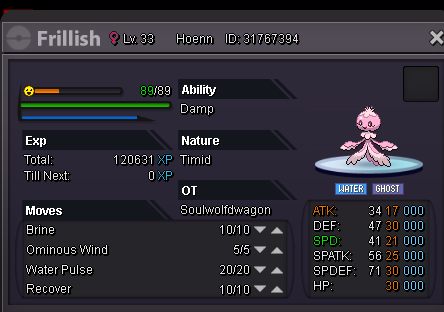
the account I found it on was SoulWolfDwagon hasnt happened since so might of been a glitch on my end or in the game but the restart/crash that happened later that day seemed to have fixed it
-
it seems fixed now strange maybe it was a glitch
-
I can not place pokemon into the PC at the pokecenter or remove pokemon from said PC now please help gold server
-
oh ok I must of missed that announcentment then I was worried about that so thank you for clearing it up for me
-
I caught a frillish it showed up blue in battle but after I caught it when ever I link it or click it to check IVs the picture is pink not blue is this a bug or no I am not sure was relucant to come to post this cuz it has good IVs and everything and I do not want to lose this frillish please help and let me know cuz I thought only shinys or pinkin pokemons show up pink not normal ones