




New Trade Zone
Trade Zone is now live
Use the new Trade Zone for auctions and instant-price trades so Pokemon and item offers are easy to find.


Braxsayan
Registered User
-
Joined
-
Last visited
Everything posted by Braxsayan
-
ty noted
-
ty noted
-
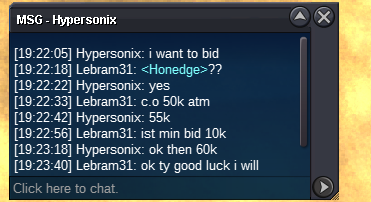
.start offer : 50k .insta : no one .curent offer : 250k by killzone96 .min raise : 10k .end of auction : sunday 10/30/2022 at 09.01pm ( france timed ) accept cc = 350k
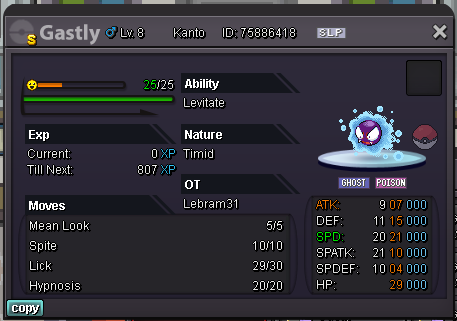
-
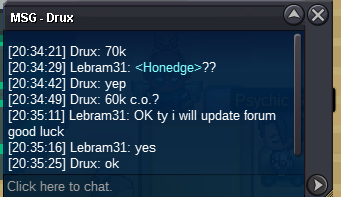
auction ended drux winner
-
bumpupdatety notedty noted.start offer : 10k .insta : no one .curent offer : 70k by drux .min raise : 10k .end of auction : wednesday 10/26/2022 at 09.01pm ( france timed ) accept cc = 350k
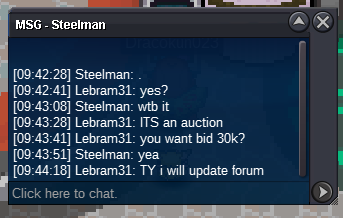
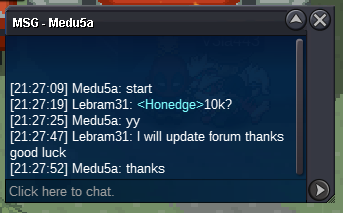
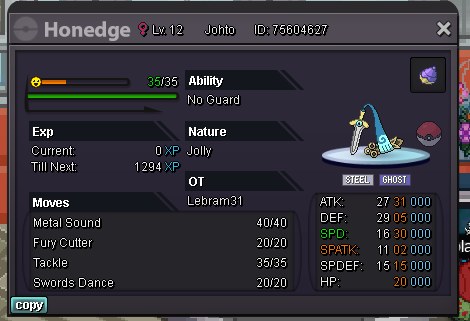 BUMPBUMPUPDATEDupdatedupdatedbumpthank you very much 🙂bumpnobody outbided me its not fairlet the moderators decide who is right and who is wrongstill nobody outbided me so i won didnt take any advantade of any windownobody offer more than 700k and you didnt say "each"
Account
Navigation
Search
Configure browser push notifications
Chrome (Android)
- Tap the lock icon next to the address bar.
- Tap Permissions → Notifications.
- Adjust your preference.
Chrome (Desktop)
- Click the padlock icon in the address bar.
- Select Site settings.
- Find Notifications and adjust your preference.
Safari (iOS 16.4+)
- Ensure the site is installed via Add to Home Screen.
- Open Settings App → Notifications.
- Find your app name and adjust your preference.
Safari (macOS)
- Go to Safari → Preferences.
- Click the Websites tab.
- Select Notifications in the sidebar.
- Find this website and adjust your preference.
Edge (Android)
- Tap the lock icon next to the address bar.
- Tap Permissions.
- Find Notifications and adjust your preference.
Edge (Desktop)
- Click the padlock icon in the address bar.
- Click Permissions for this site.
- Find Notifications and adjust your preference.
Firefox (Android)
- Go to Settings → Site permissions.
- Tap Notifications.
- Find this site in the list and adjust your preference.
Firefox (Desktop)
- Open Firefox Settings.
- Search for Notifications.
- Find this site in the list and adjust your preference.