New Trade Zone
Trade Zone is now live
Use the new Trade Zone for auctions and instant-price trades so Pokemon and item offers are easy to find.

Xeratios2
Suspended
-
Joined
-
Last visited
Everything posted by Xeratios2
-
5 minutes!
-
10 minutes left
-
9.5m c.o. Thanks for the offer. 43 minutes left.
-
1 hour 8 minutes left!
-
Less than 4 hours left people!
-
c.o. 9m by biteo! thanks for the offer.
-
c.o. 8.6m by annajat12. 5 hours left!
-
Haha, i'll share papi :P
-
Less than 24 hours left!
-
C.o. By Biteo 8m. Thanks for the offer!
-
C.o. By wAkKo16. 7.4m. Thanks for the offer!
-
Bumping...
-
Good luck! i'll be lurking.
-
Thanks everyone! 3 more days left.
-
Best current offer.
-
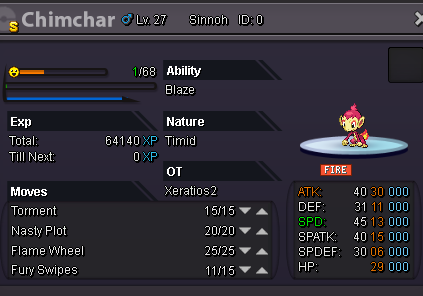
**Auction started! C.O. wakko16, 9.5m Ends on tuesday 7:13 pm. UTC+1 (Less than 1 hour left) Starting at 7m. Insta buyout is 20m min bid: 100k Duration: 5 days. after first bid. (cash offers only!) Good luck! (any bids that i get in-game will be screenshotted here as proof.) For those who wish to contact me through discord, you can add me. Discord username: Shengi/Rashnu.5370#9938 I have the right to cancel the sale if I'm not satisfied with the price. Any fake offers will be reported. I know the rules may have changed now since I forgot to write this, but since no one has bid yet, I think it's somewhat okay. If a trade mod considers this is not allowed, I will edit this and leave the post as it originally was.