




New Trade Zone
Trade Zone is now live
Use the new Trade Zone for auctions and instant-price trades so Pokemon and item offers are easy to find.

Asurash
Registered User
-
Joined
-
Last visited
-
Starting Bid: 100K Min Bid: 10k No Insta Payment: Pokedollars, IV Reroll: 550k, CC: 500k Auction ends 24 hours after first bid Good Luck!!!

-
https://postimg.cc/PCV3FZcK trade done
-
silver
-
dm me in game please, steve
-
end of auction, steven won
-
12 minute left !!
-
up
-
Start Price: 1m Min Raise: 200k Insta: No Insta End: 48 hours after first bid first bid started : 19:15 Sunday, March 2, 2025 (UTC+1) and end 48h later
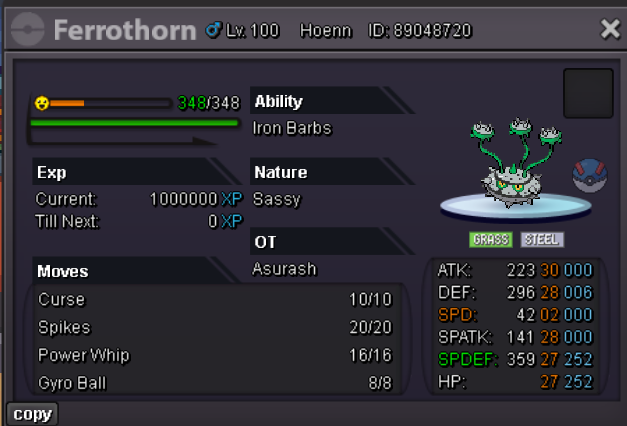
-
thx for the auction, guys 😄
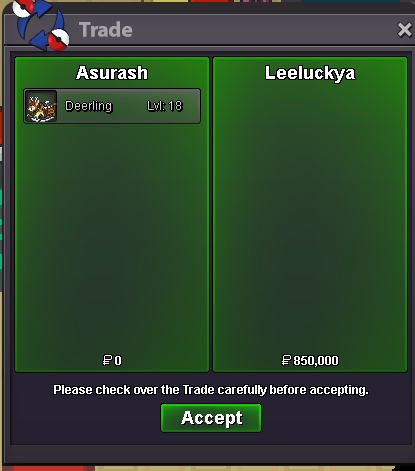
-
End of auction winner is lucky, whats ur ign, tell me what is the command to pm btw, i dont know it
-
good night dream 🙂 thx to have participated in my auction 9 min left
-
11 minutes left ^^ if no bid
-
https://pokemonrevolution.net/forum/topic/119709-forums-and-in-game-auction-rules/
-
- Forum: If a bid is received in the final 15 minutes of the auction, the end point will be delayed by 15 minutes from that bid, and will be delayed by 15 minutes for each new bid thereafter, until the current offer has been held for a full 15 minutes. Must be accurate to the minute that the auction is set to end. i wasnt missinformed after all, i'll follow that rules
-
its the rules that are like that, didnt make the rules
