New Trade Zone
Trade Zone is now live
Use the new Trade Zone for auctions and instant-price trades so Pokemon and item offers are easy to find.

Lucasaman6
Registered User
-
Joined
-
Last visited
-
3.6m
-
4.5m
-
Guys, gible insta sold to justbillionare. I wanna thank all the participants of the auction, and see u next time. Topic can be closed.
-
I'm really sorry about what happened, Hawlucha. I'll pay attention to that in other possible auctions. As u want, min bid will be 1m. And thanks for the advertisement.
-
Auction started. B.O 15m from nhoxvip555555. Auction finishes at 09/17/2020 00:37 (GMT-3).

-
Hello guys, I'm here to sell this shiny gible, so I'm gonna make an auction. Rules are: - Auction goes 48 hours from the first offer, or if insta price; - S.O: 15m; Insta: 30m - Accept cc's (400k); iv rerolls (700k) as payment methods; - Any fake offers will be reported. That's it guys, wish good luck.
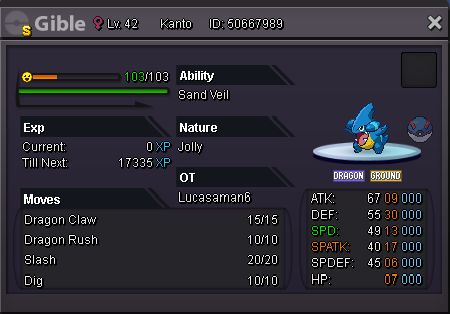 Auction has ended. Winner is Rkrishnan77 with 1.3m offer. Ty all participants. Winner may contact me ingame, nick: Lucasaman610 min. We still have time for offers.15 min leftLast 30 minutes!40 minutes.50 minutes left.Last hour. I got a problem in my pc and cannot connect. But as soon as i can I will be communicating on trade chat. When finish, gonna say here.Nice! 1.3 bo