




New Trade Zone
Trade Zone is now live
Use the new Trade Zone for auctions and instant-price trades so Pokemon and item offers are easy to find.

Kkstay
Registered User
-
Joined
-
Last visited
Everything posted by Kkstay
-
@Yavu25elim time left on rotom?
-
-
-
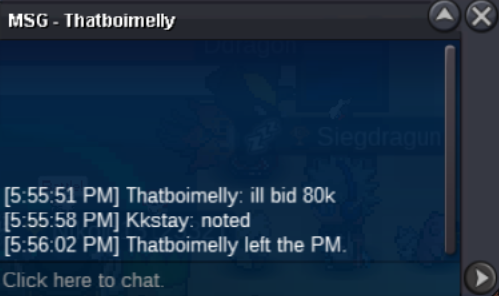
Auction Finished the winner is Bakshi pm me in gameAuction timer started 80k
 C.O 250K min add 10k Duration 24hrs
 30 spd is max speed for hp fire pahnikumarbumpS.O. 2M Min add 100k Duration 24h Have fun 🙂
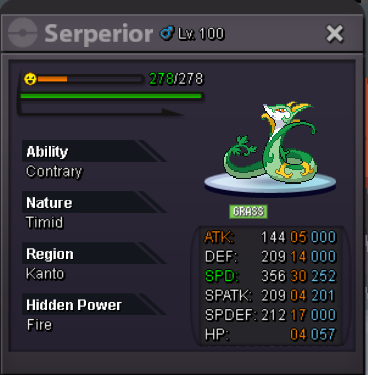 S.O. 600k Min add after start 50k Duration 24hours Good luck 🙂
 Trade completed can be closed
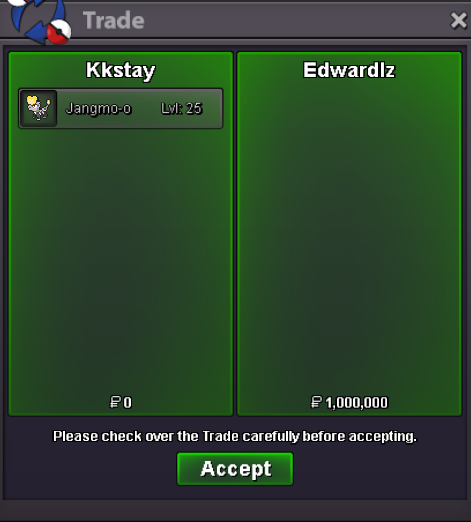 @EdwardLZ you have won the auction pm me when you want to meet either in game or forumAuction ends in approximately 3 hoursbumpTodays auction is my Jangmo-o S.O 1mill min add 100k accept pokedollars and CC 400k Auction duration: 24hours from first bid Please make sure to bid only if you have the means to honor your bid Happy bidding 🙂
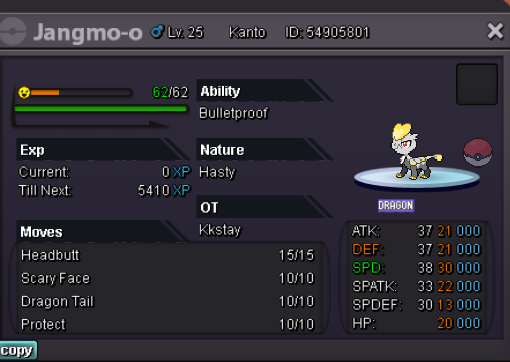 @Monteria how am i to confirm that someone has the funds? i mean people may troll or whatever i mean i need a way to confirm the validity of bids before posting them here ?Auction S.O 1million Auction duration 24hours from first bid Min add 100k Happy bidding 🙂WTB PANGORO ADAMANT BOSS READY!

Account
Navigation
Search
Configure browser push notifications
Chrome (Android)
- Tap the lock icon next to the address bar.
- Tap Permissions → Notifications.
- Adjust your preference.
Chrome (Desktop)
- Click the padlock icon in the address bar.
- Select Site settings.
- Find Notifications and adjust your preference.
Safari (iOS 16.4+)
- Ensure the site is installed via Add to Home Screen.
- Open Settings App → Notifications.
- Find your app name and adjust your preference.
Safari (macOS)
- Go to Safari → Preferences.
- Click the Websites tab.
- Select Notifications in the sidebar.
- Find this website and adjust your preference.
Edge (Android)
- Tap the lock icon next to the address bar.
- Tap Permissions.
- Find Notifications and adjust your preference.
Edge (Desktop)
- Click the padlock icon in the address bar.
- Click Permissions for this site.
- Find Notifications and adjust your preference.
Firefox (Android)
- Go to Settings → Site permissions.
- Tap Notifications.
- Find this site in the list and adjust your preference.
Firefox (Desktop)
- Open Firefox Settings.
- Search for Notifications.
- Find this site in the list and adjust your preference.