-
problems with mimikyu movements
The pokemon is already fixed, thank you very much for the help.
-
problems with mimikyu movements
I hope they can fix the ivs, the poke like that is not useful to me, thanks.
-
problems with mimikyu movements
The issue of the moves was solved, but they took away the ivs, it had 26 atk 29 spd = (, they left it with 09 atk 15 spd so it doesn't help me at all
-
problems with mimikyu movements
the server is gold and the id is 40000540 I hope you can help me thanks
-
problems with mimikyu movements
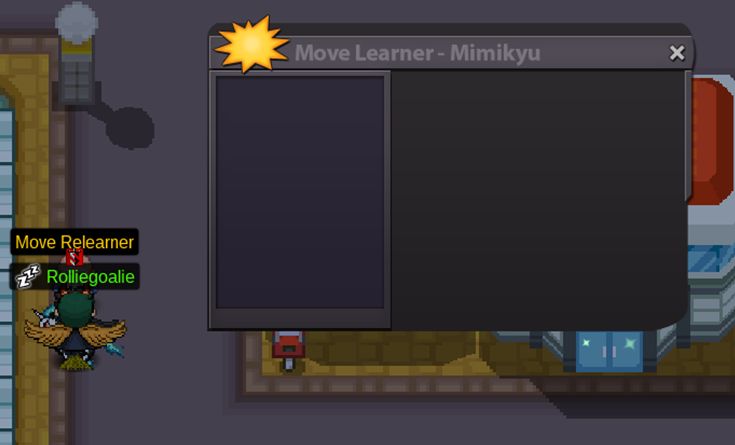
my mimikyu does not learn any movement neither by lvl, nor by tm, nor by tutor nor in the remember movements, please help
-
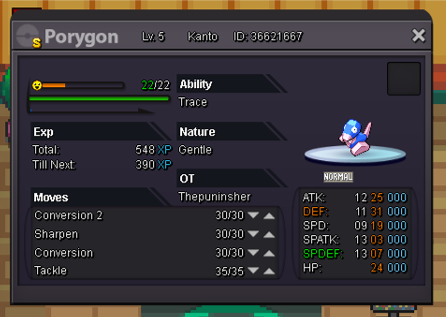
wts Porygon shiny c.o 5.2m by left 2 days min raise 200k
subasta acabado vendido Allsmell co 7.5m
-
wts Porygon shiny c.o 5.2m by left 2 days min raise 200k
the offer accepted 7.5m ALLSMELL by left 1 hours min raise 200k forum
-
wts Porygon shiny c.o 5.2m by left 2 days min raise 200k
la oferta aceptada Solidbullet co 6.7m por izquierda 2 horas min elevar 200k
-
wts Porygon shiny c.o 5.2m by left 2 days min raise 200k
3 hours for the auction to end
-
wts Porygon shiny c.o 5.2m by left 2 days min raise 200k
la subasta termina en 37 horas
-
wts Porygon shiny c.o 5.2m by left 2 days min raise 200k
[ATTACH type=full" alt="157214]157214[/ATTACH] Oferta actual de 6.5m [uSER=789106]basilisgountis[/uSER]
-
wts Porygon shiny c.o 5.2m by left 2 days min raise 200k
- wts Porygon shiny c.o 5.2m by left 2 days min raise 200k
wts porygon Solidbullet c.o 5.2m by left 2 days min raise 200k- wts Porygon shiny c.o 5.2m by left 2 days min raise 200k
- Auction / +16 / Max Spd / Adamant / Adaptability / Crawdaunt
I START THE OFFER 1,5M FOR THE CRAWDAUNT - wts Porygon shiny c.o 5.2m by left 2 days min raise 200k
Kcdios
Suspended
-
Joined
-
Last visited
Account
Navigation
Search
Configure browser push notifications
Chrome (Android)
- Tap the lock icon next to the address bar.
- Tap Permissions → Notifications.
- Adjust your preference.
Chrome (Desktop)
- Click the padlock icon in the address bar.
- Select Site settings.
- Find Notifications and adjust your preference.
Safari (iOS 16.4+)
- Ensure the site is installed via Add to Home Screen.
- Open Settings App → Notifications.
- Find your app name and adjust your preference.
Safari (macOS)
- Go to Safari → Preferences.
- Click the Websites tab.
- Select Notifications in the sidebar.
- Find this website and adjust your preference.
Edge (Android)
- Tap the lock icon next to the address bar.
- Tap Permissions.
- Find Notifications and adjust your preference.
Edge (Desktop)
- Click the padlock icon in the address bar.
- Click Permissions for this site.
- Find Notifications and adjust your preference.
Firefox (Android)
- Go to Settings → Site permissions.
- Tap Notifications.
- Find this site in the list and adjust your preference.
Firefox (Desktop)
- Open Firefox Settings.
- Search for Notifications.
- Find this site in the list and adjust your preference.