




New Trade Zone
Trade Zone is now live
Use the new Trade Zone for auctions and instant-price trades so Pokemon and item offers are easy to find.

Moonknighto
Suspended
-
Joined
-
Last visited
-
no a good day , i think
-
bump
-
bump
-
bump
-
Halloween Ponyta for Auction Starting price: 10m Min. Bid: 200k Insta: 15m Auction will last 2 days after first bid Contact me here, my mail [email protected] ===============================
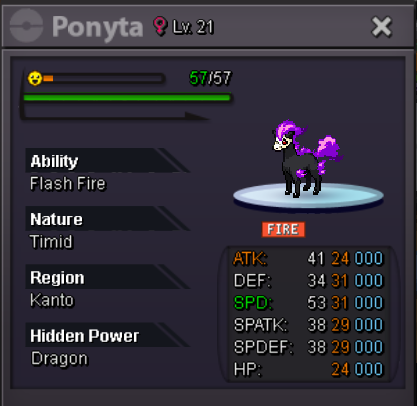
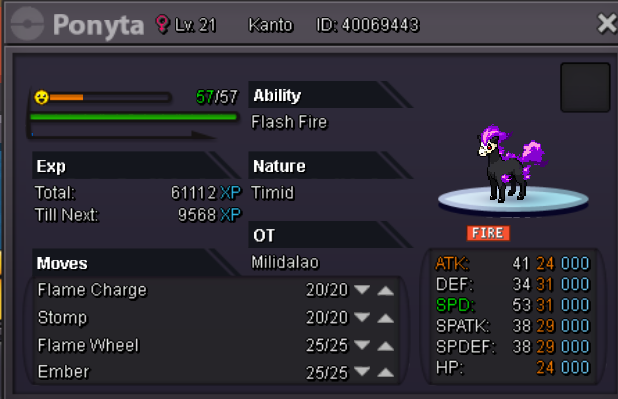
-
can i ask this problem is OK?
-
place
-
I take 6 pokem battle with he (he take 3),i think I used my Gengar(LV.100,take nothing items) face to his Donphan (low level , study - ability, Shell Bell - items) [ i think i used shadow Ball and he use endeavor at first. ] [ he use quick attack , gengar articulo mortis ] [ i make rotom enter (rotom-wash,take choise glasses,) , use trick ,and i forget he use what moves , ] then he disconnected,and the glasses is missed , not in my please and his.
-
it was happen when i was battle with my friend , it is no in wild battle ,and the choice glasses is not find in ereywhere(my backpack,PC-pokemin Storage ,my friends)


-
help!! my choice glasses was missed by trick when battle wish my friend can anyone help me ? sliver/MoonKNIGHTO
-
HELP~~~
-
help!! my choice glasses was missed by trick when battle wish my friend can anyone help me ? sliver/MoonKNIGHTO
-
me too i just think it means restar the story, i m so sad for this mistake, QAQ,