New Trade Zone
Trade Zone is now live
Use the new Trade Zone for auctions and instant-price trades so Pokemon and item offers are easy to find.

Revanche83
Registered User
-
Joined
-
Last visited
-
Yep, my IGN is Revanche83, I am online now at Vermi, if it is not OK for you just pm me when you're available
-
Bump!
-
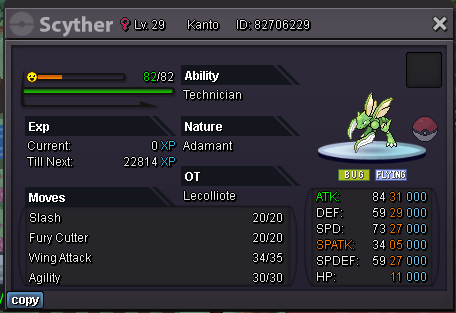
Auction Details for both Scyther & Heracross: Start Price: 100k End Point: 72 hours after first bid Insta Price: N/A Minimum Raise: 50k Accepted Payments: Pokedollars, Coin Capsules (x1 Coin Capsule = 450k), IV Reroll Tickets (x1 IV Reroll Ticket = 600k) Note: If a bid is received in the final 15 minutes of the auction, the end point will be delayed by 15 minutes from that bid, and will be delayed by 15 minutes for each new bid thereafter, until the current offer has been held for a full 15 minutes. Good luck!
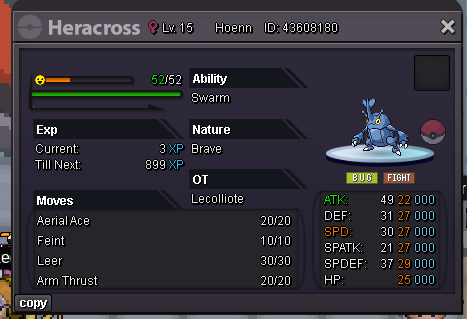
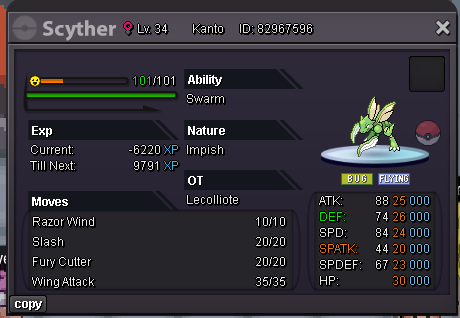
-
5,4m rotom
-
I am online now @Ozmon93
-
@Ozmon93 Are you available ?
-
Are you available @Dragonplayers?
-
Congrats Leeluckya you won, It will be difficult for me to connect this evening, if you're ok, we can make te sale tomorrow
-
Current B.O 2.3m by Leeluckya . 10mn left
-
Bump. Current b.o 200k by Lacomus. 4,45 hours left
-
Bump, current b.o 300k by DragonPlayers . 5,30 hours left
-
Bump, almost 6 hours left , current b.o 2m by Weaponsx
-
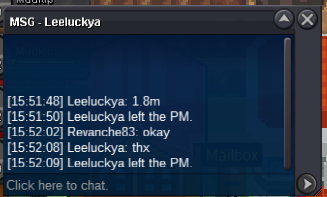
Current best offer is 1.8m by Leeluckya
-
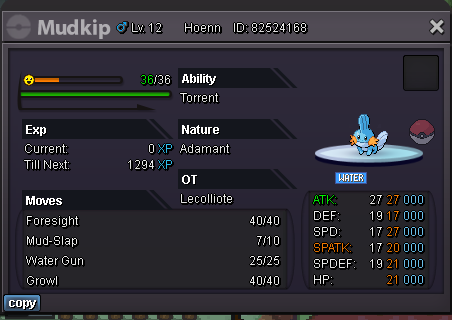
Hello Start : 200k Min bid : 100k Insta : None Auction end 48 hrs after first bid accept money,cc for 400k and rc for 7k
-
Hello Start : 200k Min bid : 100k Insta : None Auction end 48 hrs after first bid accept money,cc for 400k and rc for 7k