




New Trade Zone
Trade Zone is now live
Use the new Trade Zone for auctions and instant-price trades so Pokemon and item offers are easy to find.

Thedarktrainers
Suspended
-
Joined
-
Last visited
-
Congrats when will you be available Im also same name on discord for quicker reply’s
-
2.5m current lead
-
Auction Start 2.5m Raise by 100k+ at a time. insta= 6m Ends 24 hours from first bid. cc=300k, iv rr= 600k
-
Not selling. It says it’s an auction for them all as a group. 10m to start.
-
-
Hello! Im out of town trying to play at a hotel and I have full LTE service through Verizon, and my WiFi sharing/ tethering is letting me do anything on my laptop besides play pro. I can watch YouTube or anything. But pro just keeps saying “can not connect”. Am I missing something??
-
Ended last night.
-
7 hours left
-
7 hours left
-
Start 600k Bid: 50k min Insta : 1.4m Auction ends in 14 hours. At 10 pm eastern USA time

-
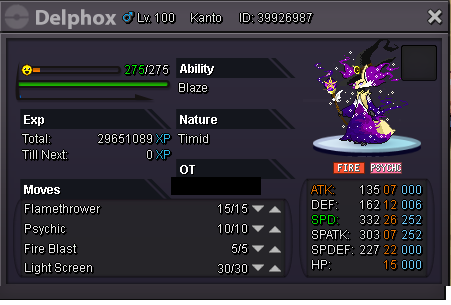
Hybrid Flamethrower Ele, beast in pvp. Start : 300k Insta :900k Bid: 50k minimum 14 hours from post; ends 10pm eastern US time.

-
Bump! Updated with some Good pokes. Hp fire serp also
-
Sorry I thought you knew my stuff I just seen this. I had bought from you before
-
Actually I’ll insta buy at 2m.
-
1.2m