




New Trade Zone
Trade Zone is now live
Use the new Trade Zone for auctions and instant-price trades so Pokemon and item offers are easy to find.

Saranghaeyo
Suspended
-
Joined
-
Last visited
-
ALL POKES SOLD THANKS EVERYONE! Sorry for some miscommunications thanks again cya all next time..

-
17mins remaining for venu

-
yeah sry i just answered jugheads comment .. where are you ? can come in verm?4m b.o by dayne currently and its 24mins leftthanks gliscor is delayed then for another 15mins as ruleIm using gmt+8 so pls try to check our time too so you'll be aware of it.. my auction is still ongoing 11mins left for glis and 36mins for metagross ..Alakazam sold to alderego7 thanks all!

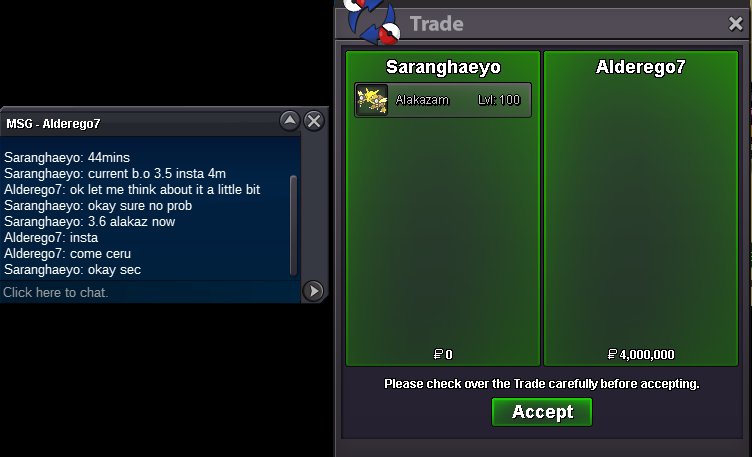 min raise for meta is 300k .. want to go 3.6?yes already updated it and noted it there "at the bottom" few hrs ago.. seems a lot like alakazam so just increase a lil bit insta and wont change it or others anymore.. as far as i know its not against the rules in selling or auction. (only alakazam increased a lil bit) hope u understand and thanks for offering :)


Account
Navigation
Search
Configure browser push notifications
Chrome (Android)
- Tap the lock icon next to the address bar.
- Tap Permissions → Notifications.
- Adjust your preference.
Chrome (Desktop)
- Click the padlock icon in the address bar.
- Select Site settings.
- Find Notifications and adjust your preference.
Safari (iOS 16.4+)
- Ensure the site is installed via Add to Home Screen.
- Open Settings App → Notifications.
- Find your app name and adjust your preference.
Safari (macOS)
- Go to Safari → Preferences.
- Click the Websites tab.
- Select Notifications in the sidebar.
- Find this website and adjust your preference.
Edge (Android)
- Tap the lock icon next to the address bar.
- Tap Permissions.
- Find Notifications and adjust your preference.
Edge (Desktop)
- Click the padlock icon in the address bar.
- Click Permissions for this site.
- Find Notifications and adjust your preference.
Firefox (Android)
- Go to Settings → Site permissions.
- Tap Notifications.
- Find this site in the list and adjust your preference.
Firefox (Desktop)
- Open Firefox Settings.
- Search for Notifications.
- Find this site in the list and adjust your preference.