




New Trade Zone
Trade Zone is now live
Use the new Trade Zone for auctions and instant-price trades so Pokemon and item offers are easy to find.

Ghostifique
Registered User
-
Joined
-
Last visited
-
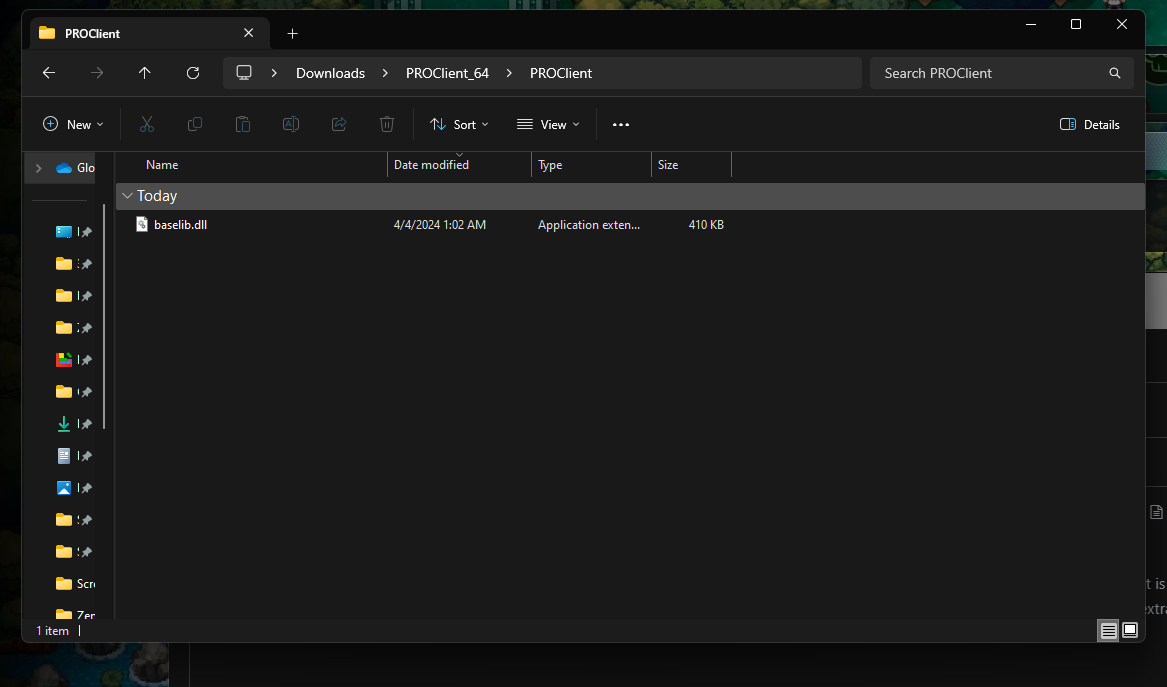
On Windows trying to download the 64 bit version Okay SO I've been trying to play PRO but can't seem to get it. I download the files from the main website and then extract them all. All that is left in the folder is "baselib.ddl". I looked up videos of other people downloading and then playing but they get different files including the main client. When I first download the files, without extracting, there's a ton more in there but they all go away after I extract. I know I'm probably missing something simple... Screenshot is what is left after I extract. I'll also add I cannot run it without doing that
-
Hello all. I just started playing tonight and so far the game is pretty fun. I just have a few questions related to the game, if anyone has a chance to reply. Am I allowed to go to a different region? Is trading only Pokemon for Pokemon? Are gym badges supposed to be done in order? Can I obtain Pokemon from other regions to use in Kanto? Thanks for replying in advance.
