




New Trade Zone
Trade Zone is now live
Use the new Trade Zone for auctions and instant-price trades so Pokemon and item offers are easy to find.


Ahir
Registered User
-
Joined
-
Last visited
Everything posted by Ahir
-
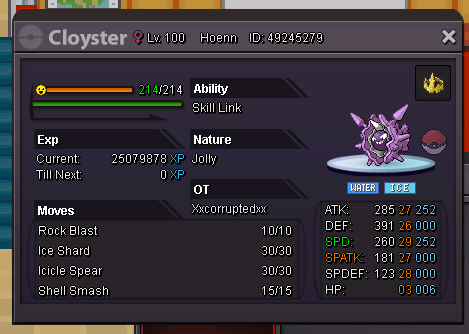
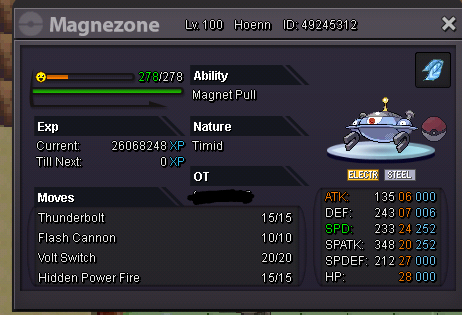
Starting offers decreased for Snorlax and Magnezone!
-
Price 400k
-
Price 450k
-
-
-
-
-
-
1.9m
-
Sold!

-
Auction ended. Sold to Piproom in 3.2m! I will try to trade as soon as possible.
-
Noted, auction I'll end in approx. 2 hrs from now.
-
Noted sir, Sorry for late response. Approx. 39 hours left.
-
Bump! (Approx.) 48 hours left.
-
1.5m by Piproom!

-
Noted
-
Noted Auction will end after 72 hours from now.
-
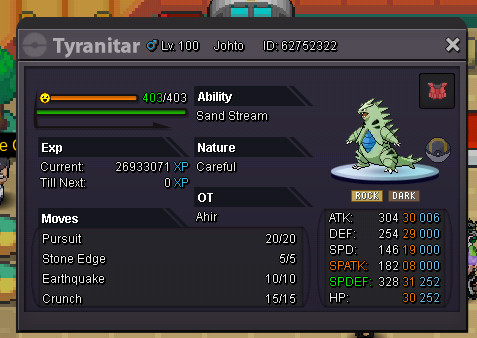
Sold to piproom in 3.2m. Min bid. - 100k No insta Time 72 hours from start. Accepted payment- Pokemoney Reroll ticket[700k], Coin capsule [380k] Nature reroll ticket [350k] Good luck to everyone.
-
My rating was 210 and after that i won a PvP , my rating got 230. After some seconds the server got crashed and when i got reconnect my rating was 210. That was not my fault that the server got crashed. I lost my 20 rating. My pokemon who got fainted in PvP are still fainted after crash. I don't know wht happened. I want my rating back.
-
Hey, Can u show me?
-
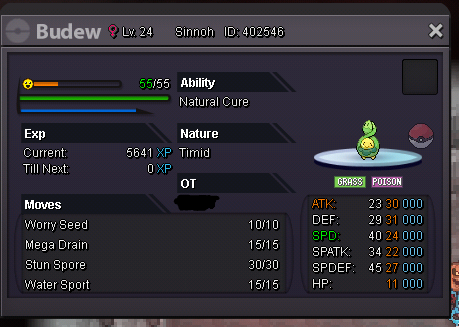
S.o - 100k Min raise - 20k Insta - 500k. It has hp fire!
-
I wanna buy tanky carefull tyranitar or pre evo. And a adamant hawlucha. Leave ss of ur poke with price.
-
-
U don't need to show him 31 spd poke. U just need to show him a trained poke with high spd. I hv shown him my volcarona with 29 spd. Try to show him any 300+ spd poke. Hope it helps.
-
Thx for ur answer.