New Trade Zone
Trade Zone is now live
Use the new Trade Zone for auctions and instant-price trades so Pokemon and item offers are easy to find.

Rhonu
Registered User
-
Joined
-
Last visited
-
Thank you so much, this is really helpful! I appreciate it.
-
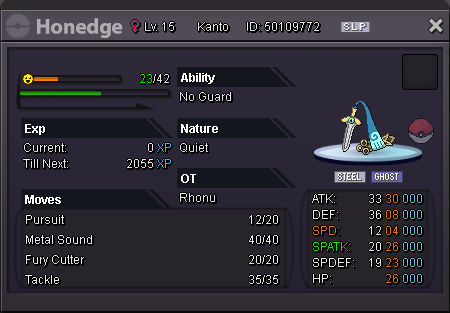
Oh wow I guess I got lucky today. I'm not desperate for money right now so I'll definitely keep it and train it up for the E4 and get a Gengar later. Any tips for what moveset to give Honedge and what EVs to focus on?
-
I was going through my usual digspot route and in MtMoon I encountered this Honedge: I'm pretty new to the whole EV training business and I think it's decent but what do I know lol. I haven't decided yet what my team for the E4 is gonna be, would this Honedge make for a good pokemon in my final Kanto team and if yes, what EVs should I focus on and what moveset should I give it? And is it a good alternative for Gengar or should I also get one of those?