




Skip to content
View in the app

A better way to browse. Learn more.

Pokemon Revolution Online

A full-screen app on your home screen with push notifications, badges and more.

To install this app on iOS and iPadOS
  1. Tap the Share icon in Safari
  2. Scroll the menu and tap Add to Home Screen.
  3. Tap Add in the top-right corner.
To install this app on Android
  1. Tap the 3-dot menu (⋮) in the top-right corner of the browser.
  2. Tap Add to Home screen or Install app.
  3. Confirm by tapping Install.
New Trade Zone
Trade Zone is now live
Use the new Trade Zone for auctions and instant-price trades so Pokemon and item offers are easy to find.
Open Trade Zone

Ish188

Registered User
  • Joined

  • Last visited

Everything posted by Ish188

  1. Awaiting for reply
  2. Respected Sir, This is to inform you that for some reason I received another beedrillite megastone today on conclusion of 3rd win in BCC instead of Pinsirite. Reporting for your kind notice. Thanks
  3. Ish188 replied to Ish188's topic in Resolved Bugs
    Hi!! I believe the bug has been fixed just decided to reply back for formal closure of issue ticket. But just want to get in notice lag is still there in gameplay.
  4. Ish188 replied to Ish188's topic in Resolved Bugs
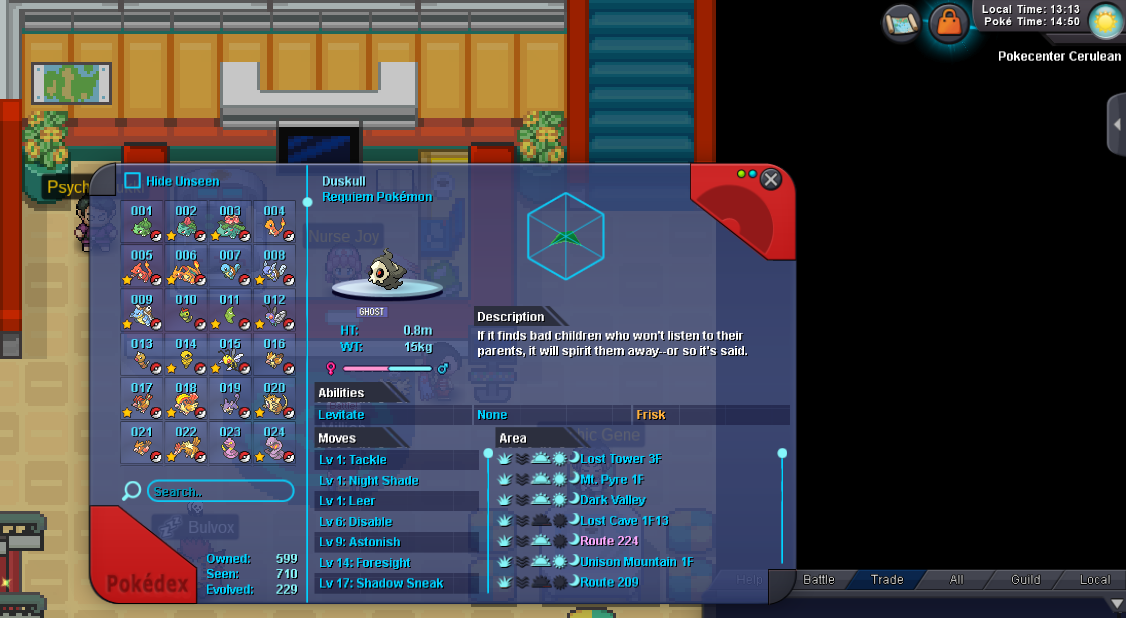
    Hi still not changed plus lag is enormous in gameplay. Please check again as evolution data is not recovered.
  5. Ish188 posted a topic in Resolved Bugs
    For some reason my evolve data is not showing correctly & and there is a continuous problem in gold server.

Account

Navigation

Search

Search

Configure browser push notifications

Chrome (Android)
  1. Tap the lock icon next to the address bar.
  2. Tap Permissions → Notifications.
  3. Adjust your preference.
Chrome (Desktop)
  1. Click the padlock icon in the address bar.
  2. Select Site settings.
  3. Find Notifications and adjust your preference.