




New Trade Zone
Trade Zone is now live
Use the new Trade Zone for auctions and instant-price trades so Pokemon and item offers are easy to find.

Topology
Registered User
-
Joined
-
Last visited
-
No offers came, can you close the subject?
-
-
AUCTION CONDITIONS ; 1-The auction will take 2 days from the moment I post this article. 2-The highest bidder will win 3-Fake offers will be reported. 4-Auction starts from 1M 5-New increases will be 250K 6-I will see the winner at the end of the auction on the forum, the withdrawn bids will be reported, I will follow the bids instantly and take a screenshot 7-!!! Only pokedoes will be accepted !!! 8- İnsta 7m **Good luck everyone** My name is ''topology''
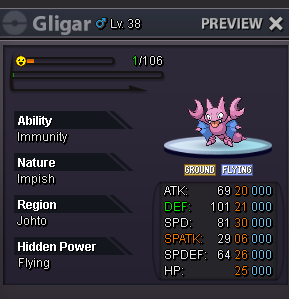
-
congratulations, best wishes
-
Since no one has written it for 15 minutes, you won, right?
-
sorry, mod. I did not know. Thanks for your understanding. This is the first time I'm auctioning and using the forum. thank you for the information.
-
I didn't know, thanks.
-
I didn't know, thanks.
-
I didn't know, thanks. also your offer is very good.. BRAVO
-
2 minutes before the end of the auction
-
3 minutes before the end of the auction
-
10 minutes left
-
10 minutes left
-
10 minutes left
-