New Trade Zone
Trade Zone is now live
Use the new Trade Zone for auctions and instant-price trades so Pokemon and item offers are easy to find.

Anpade
Registered User
-
Joined
-
Last visited
-
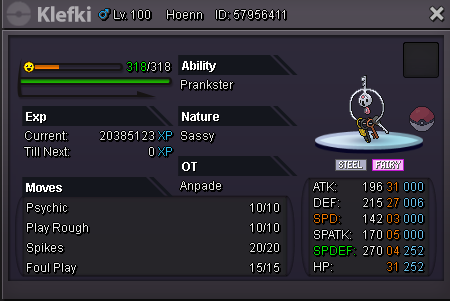
Auction: Start bid: 600k Min. Raise: 50k Insta: 2.3m End 24 Hours after first bid also accept CC=400k RRTicket=700k

-
Hey, did you ever want to be part of Team Rocket? Did it always annoy you that you couldn't join Team Rocket? If that applies to you, then this is your chance because we are Team Rocket and we are looking for you to take over this Server! With your help there soon will be the Team Rocket "R" over players everywhere you go. We don't only give you the option to be part of Team Rocket ingame and have the Rocket "R" over your character, We also have a Discord Server with a nice group of Rocket Grunts. We have voice channels for germans but also some english voice channels for international players. So if this sounds appealing and you want to be the next Grunt of Team Rocket all you have to do is wear a Rocket Uniform and text Germarc, Anpade, or Plarox ingame or reply to this topic with your username so we can invite you to Team Rocket. We're sure we will hear from you.

-
-Start offer: 600k -Min. raise: 100k -Instant: 2,5m -Auction finish 48h after first bid