




New Trade Zone
Trade Zone is now live
Use the new Trade Zone for auctions and instant-price trades so Pokemon and item offers are easy to find.


Kosano
Registered User
-
Joined
-
Last visited
-
Hi, this listing has been closed. Sold in game yesterday and couldn't get on to update it.
-
-
-
-
Kosano changed their profile photo
-
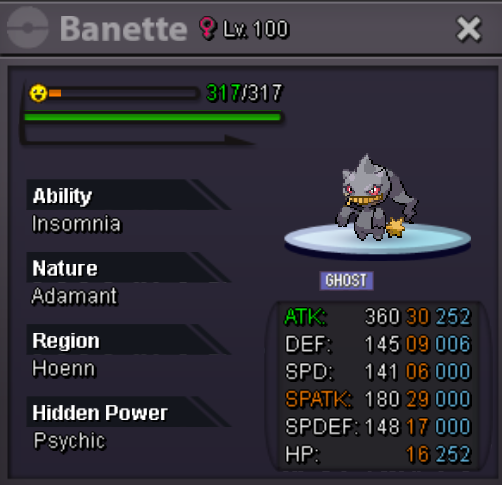
Contact Me Kosano - Ingame Kosano#6603 - Discord (Or on here) Accepted Payments Pokedollar Coin Capsule 350k IV Reroll 680k Bossable Banette (Moveset Ready) Price: 375k
-
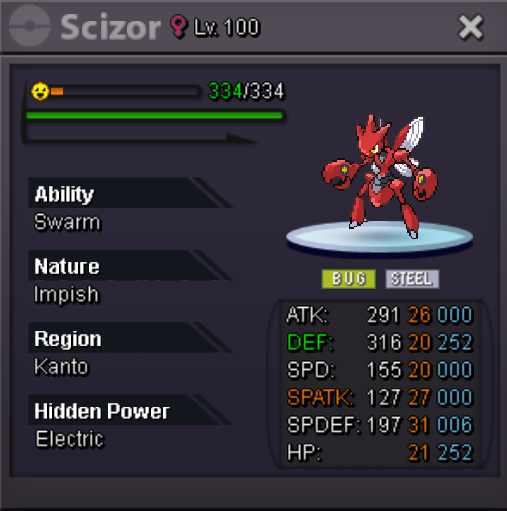
Contact Me Kosano - Ingame Kosano#6603 - Discord Accepted Payments Pokedollar Coin Capsule 400k IV Reroll 700k Scizor Starting Offer: 400K Min. Increase: 50k Instant Price: 1m Time After 1st Bid is 72hrs Poke was sold in game and forgot to update.
-
Oh thanks it didnt show up before.
-
Probably in the minority here but since I basically use my mount to travel around everywhere, I've been getting a headache listening to it constantly and i I want to listen to the BGM of the current city, I have to walk. Suggesting the idea of turning off bike music in the settings and letting the other music play instead.
-
Did not know that thanks, new player and just found it weird that wasnt added yet. I recently joined a guild and members msg me about wheres the logo etc.
-
I would like to suggest the some toggle in the settings that lets us see our own name or guild logo above our character. A few guildies wanted to see their guild logo and such.