




New Trade Zone
Trade Zone is now live
Use the new Trade Zone for auctions and instant-price trades so Pokemon and item offers are easy to find.

Arsole
Suspended
-
Joined
-
Last visited
Everything posted by Arsole
-
Payment Methods Coin capsule = 380k | IV Reroll Ticket = 530k | Pokedollar Klefki 𝗦𝗧𝗔𝗥𝗧 : 600k INSTA : 2.5M MIN BID: 100K AUCTION TIME : 48 hours after first bid
.png.91718f7481552ff3fc84c70ffd0cadd7.png)
-
start adamant pancham
-
-
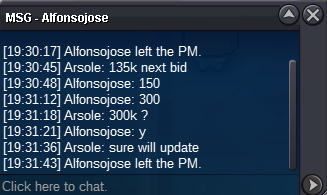
auction has ended. Player00 won the auction with 400kAuction has ended. Alfonsojose won the auction.400k by Player00
.png.2c17d191dd2673dbe139ed908f13f5d7.png) 300k by Ahnnjhello22
300k by Ahnnjhello22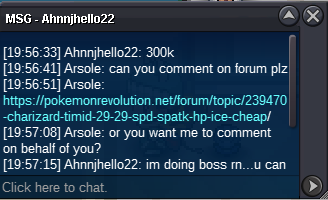 300k by Alfonsojose
 Auction started. will end at wednesday 2pm gmtStarting Offer: 100k Min Raise: 10k No Insta Auction ends 48h after first bid is placed
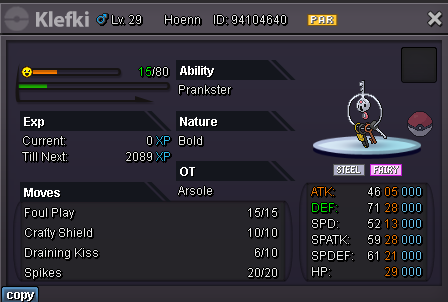 BumpStarting Offer: 200k Min Raise: 50k No Insta Auction ends 48h after first bid is placed
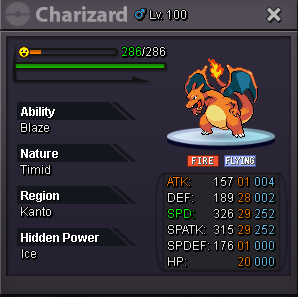 250k1. What's your Player name (IGN)? : Arsole 2. Number of hours played? : 605 3. What's your favorite Pokemon? : haxorus 4. What do you enjoy doing the most in PRO? (Hunting, Dungeons, PvP, trading, etc) : trading hunting PvE 5. How long have you been playing Pokemon? (Optional) : 3 Years 6. Favorite ice cream flavor. (Optional) : Strawberrynot for sell anymorenot for sell anymoreI have sold this pokestart offer - 250k min raise 30k insta- 600k Auction ends 48hrs after first offer accept cc - 350k, nature reroll - 350k
.png.7ab5ff20e1922721bddcea9b9abc61f2.png) start offer - 100k min raise 20k Auction ends 48hrs after first offer accept cc - 350k, nature reroll - 350k , rc- 7k
start offer - 100k min raise 20k Auction ends 48hrs after first offer accept cc - 350k, nature reroll - 350k , rc- 7k.png.df03b74e548ffb7eac6ec17499eb51d8.png) S.o : 300k Min bid: 50k Insta : 700k Auction will start after first bid 48hrs . Payment method: CC : 400k Iv rr : 800k Nat rr: 400k
S.o : 300k Min bid: 50k Insta : 700k Auction will start after first bid 48hrs . Payment method: CC : 400k Iv rr : 800k Nat rr: 400k_LI.jpg.4d1af4035883d26a8b94f4194a2a9a7a.jpg)

.png.23b0da21f8e1d805d512a6a26062e0a3.png)