




Skip to content
View in the app

A better way to browse. Learn more.

Pokemon Revolution Online

A full-screen app on your home screen with push notifications, badges and more.

To install this app on iOS and iPadOS
  1. Tap the Share icon in Safari
  2. Scroll the menu and tap Add to Home Screen.
  3. Tap Add in the top-right corner.
To install this app on Android
  1. Tap the 3-dot menu (⋮) in the top-right corner of the browser.
  2. Tap Add to Home screen or Install app.
  3. Confirm by tapping Install.
New Trade Zone
Trade Zone is now live
Use the new Trade Zone for auctions and instant-price trades so Pokemon and item offers are easy to find.
Open Trade Zone

Shockinc

Registered User
  • Joined

  • Last visited

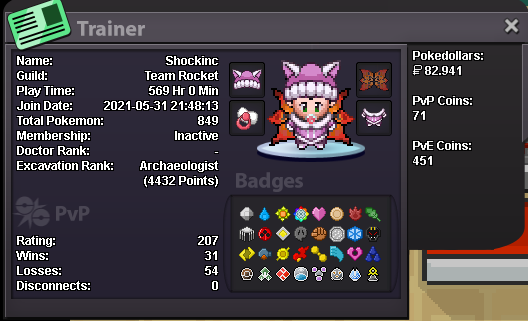
  1. How old are you and where are you from? 24years old and from austria 🙂 Why would you like to join Trinity? friends/family there and u are a good guild, i like pvp Were you part of another guild in the past and if so which one? yeah, team rocket! What is the highest rating you've ever got? 207 rn but its my first season basically What do you enjoy most doing in PRO? farming/helping others What else other than rating can you contribute to Trinity? i am a farm machine if u need me to (online 24/7) - i started recently and i try to improve myself every day Add a picture of your trainer card in the application. What is your Discord ID? hallo1234567#4152
Account

Navigation

Search

Search

Configure browser push notifications

Chrome (Android)
  1. Tap the lock icon next to the address bar.
  2. Tap Permissions → Notifications.
  3. Adjust your preference.
Chrome (Desktop)
  1. Click the padlock icon in the address bar.
  2. Select Site settings.
  3. Find Notifications and adjust your preference.