




New Trade Zone
Trade Zone is now live
Use the new Trade Zone for auctions and instant-price trades so Pokemon and item offers are easy to find.

Galaxyjaws
Registered User
-
Joined
-
Last visited
Everything posted by Galaxyjaws
-
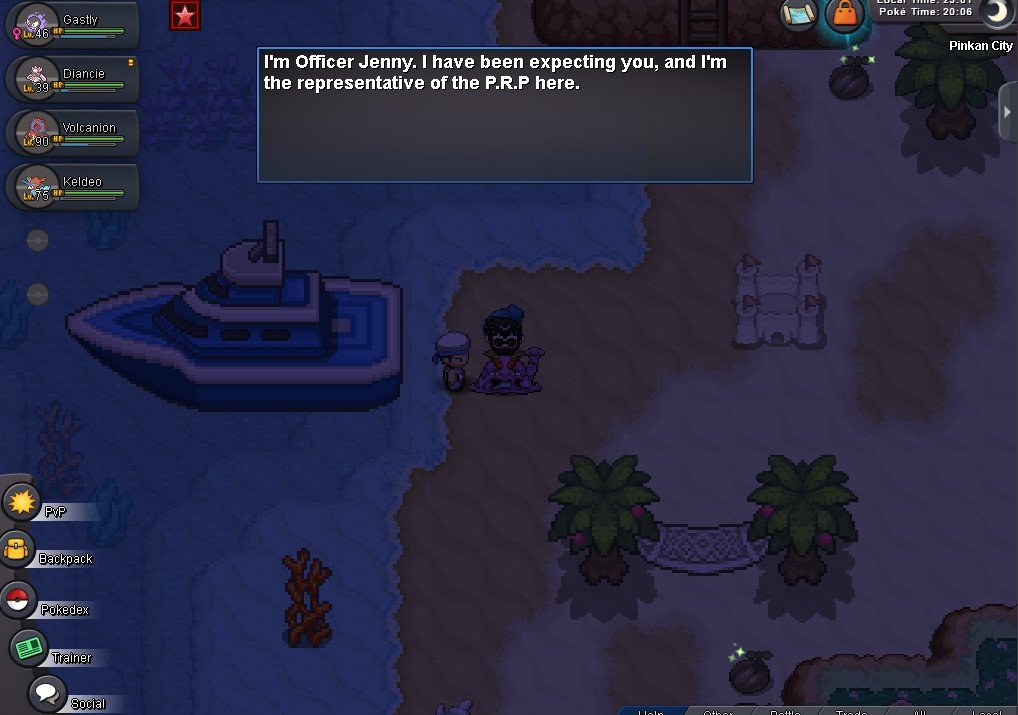
Thank you for asking me that because it made me realize I was in the wrong location! (though I'm sure you probably knew that) I managed to finish the quest, thank you very much! However there still was some minor bug going on that made me think the quest was broken, I'm going to attach a screenshot that shows my character talking to an invisible Officer Jenny, the same dialogue popped up every time I came to the island.
-
I disconnected while in a battle with a wild pokemon after defeating the 3 enemies hiding around Pinkan Island Forest. Now when I go to the cliff the guard will not let me pass claiming that I still need to defeat the enemies I've already defeated. If I leave Pinkan and come back, the dialogue with Officer Jenny and the sailor that brings you happens again, but Officer Jenny is invisible. I cannot progress no matter what I try.
-
that worked, thank you!
-
I disconnected in the Keldeo forest maze boss battle. I went back to the 3 levers and after the 3 prompts I am not teleported back to the boss room and I'm not sure if I can go there any other way.
-
I've reached the part in the pinkan island quest where you have to find the 3 hidden rocket members. I found all 3 and beat them but the guard won't let me pass to the cliff