




New Trade Zone
Trade Zone is now live
Use the new Trade Zone for auctions and instant-price trades so Pokemon and item offers are easy to find.


Howieeh
Registered User
-
Joined
-
Last visited
Everything posted by Howieeh
-
6m
-
1.4mi’ll be online in about 9 hourshiya! sure thats fine with me*SHOP IS UPDATED!!!!**SHOP UPDATE SOMETIME TOMORROW!!!*hi! im mainly on silver but i can transfer to gold too, however the hw volcarona set is sold@Cyrom
.png.bd2427de199464690840057852802e04.png)
.png.26e956d9477be295f9b7113cede4681c.png) hiya boss sadly joker set has been sold v.v all my sold cosmetics are listed at the bottom of the shopwtb these 3 boss poke 900k total
hiya boss sadly joker set has been sold v.v all my sold cosmetics are listed at the bottom of the shopwtb these 3 boss poke 900k total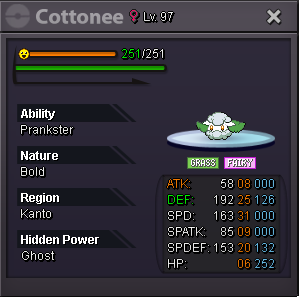
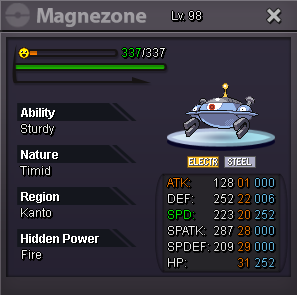
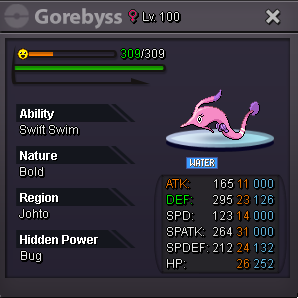 ahh no worries, but im free today to do the trade if you're available nowgetting online now, just got off work
Account
Navigation
Search
Configure browser push notifications
Chrome (Android)
- Tap the lock icon next to the address bar.
- Tap Permissions → Notifications.
- Adjust your preference.
Chrome (Desktop)
- Click the padlock icon in the address bar.
- Select Site settings.
- Find Notifications and adjust your preference.
Safari (iOS 16.4+)
- Ensure the site is installed via Add to Home Screen.
- Open Settings App → Notifications.
- Find your app name and adjust your preference.
Safari (macOS)
- Go to Safari → Preferences.
- Click the Websites tab.
- Select Notifications in the sidebar.
- Find this website and adjust your preference.
Edge (Android)
- Tap the lock icon next to the address bar.
- Tap Permissions.
- Find Notifications and adjust your preference.
Edge (Desktop)
- Click the padlock icon in the address bar.
- Click Permissions for this site.
- Find Notifications and adjust your preference.
Firefox (Android)
- Go to Settings → Site permissions.
- Tap Notifications.
- Find this site in the list and adjust your preference.
Firefox (Desktop)
- Open Firefox Settings.
- Search for Notifications.
- Find this site in the list and adjust your preference.

.png.6226f8a64cc8f9eeeaba610ad8c6267c.png)
.png.b9db93fccc6acac498e56a7636e1c2dd.png)
.png.f9227567de375187095f71dba0a101d8.png)
.png.2fd252fae30c82e760303760fda70220.png)

.png.d72d5c3a136a124eb637756d4875f510.png)
.png.13d6c2b9e9bde2ea7567023d69dea6b8.png)
.png.517e1822c8d22fdf6b8de0ce1a696235.png)
.png.b1a9ea1ed5d7805347a780b526f79df3.png)
.png.e8286c1b63e9439cb7f717b0bfdfa694.png)
.png.7ed9e5be564b863cdbc5b5a085b791a4.png)
.png.8e5bda64cf00c5af905d9cff78b5e210.png)
.png.2837c3a1207d67edc92997efe8dfdb42.png)